Photo: Sunset

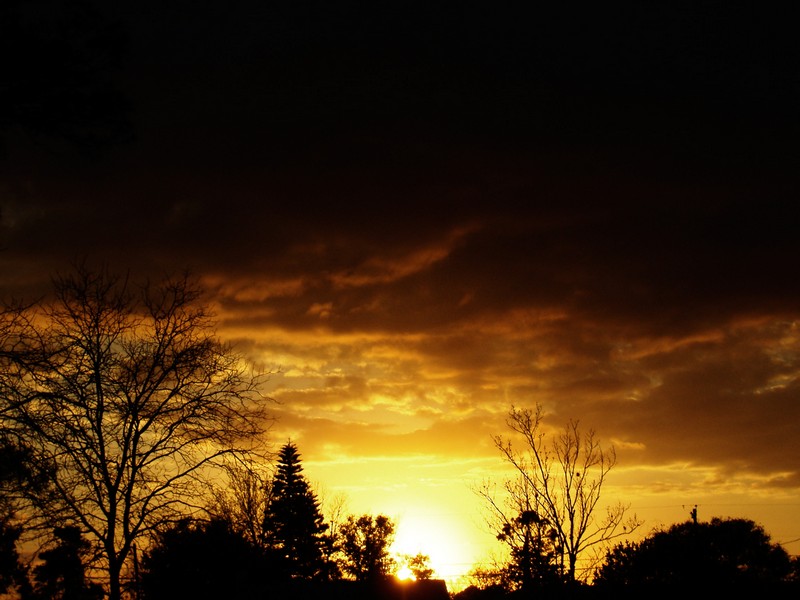
Sunset — a vivid, fiery mix of orange and white clouds at sundown

I saw the golden colors flooding in through the window just a few hours ago, so I rain out and snapped this photo of the gorgeous sunset that was gracing my front yard. I haven’t seen a sunset this impressive before. The swirls of clouds were awesome, and went far above what you see in the frame. I couldn’t fit them all in even at 18mm, which is as wide as the Canon Rebel XTi kit lens would go.

I punched the contrast up in Photoshop. The camera always captures images in such a dull way, but editing restores the beauty of the scene (Being a Free Photographer).

I literally ran out of the house to catch this, and kept taking pictures afterward, though they are less impressive. You have to work very quickly to get shots of sunsets; within ten minutes it had mostly faded away. I didn’t notice it while the clouds were forming like this; they may have looked even better then.

Canon Rebel XTi, EFS 18-55mm, 1/200, F4.5, 18mm, ISO400, 2008-08-14T20:07:55-04, 20080815-000755rxt

Download a perfected high-res JPEG or download the source image (Canon Rebel XTi RAW file).

This work is licensed under a Creative Commons Attribution 3.0 License. Credit me as Richard X. Thripp, and link back to richardxthripp.thripp.com or rxthripp.com. Thanks!

Photo: Sunrays 4

Sunrays 4 — deep blue sunrays break through the clouds

A brilliant sunset with deep blue sunrays. Shot this through the windshield from my Grandma’s car. The colors were interesting, and the contrast and light patterns beautiful.

Editing involved noise reduction, heaps of added contrast and darkening, and lots of burning on the upper-right quadrant. Enjoy!

Canon Rebel XTi, EFS 18-55mm, 1/2000, F3.5, 18mm, ISO100, 2008-07-11T17:25:14-04, 20080711-212514rxt

Download a perfected high-res JPEG or download the source image (Canon Rebel XTi RAW file).

This work is licensed under a Creative Commons Attribution 3.0 License. Credit me as Richard X. Thripp, and link back to richardxthripp.thripp.com or rxthripp.com. Thanks!

More of the Sunrays series.

ShareThis   Printable Version     
More stuff:   Photo: Sunrays    Stock: Sunrays    Source: Sunrays  

Photo: Waterlogged

Waterlogged — a hard disk platter and arm, dotted with raindrops

The hard drive that never was. Waterlogged is two years old, coming on the heels of Raindrops, but a classic nonetheless. This was the hard drive from my first computer, a budget desktop I got in 2000 (I was 9 then). In February of 2005 it failed, and I’d just left it sitting around till June of 2006 when I cracked the case open (harder than you’d think) and took this shot. The drive is a Seagate ST34311A. I was walking around the yard positioning it as a mirror, creating interesting compositions (Blend In is another), when it started raining. The hard drive got wet, and that inspired this photo. The platters make quite a mirror, making the reflections in the drops quite sharp. After drying, the mirror was covered with spots and dust I never could get off, unfortunately.

Don’t ever open your computer’s hard drive, unless it’s broke and you’ve backed up your data, or you have no hope of recovering it. The read/write head you see in the picture hovers on a cushion of air one-tenth the thickness of a hair, produced by the velocity of the spinning disk(s) (7200RPM is common now). Even a speck of dust on the platter can mess up the drive and destroy your data. Hard drives are really fragile, and generally a bad way to save information, but they’re still the best thing we have to store a lot of changing data, cheaply and quickly. Back up your pictures to CDs or DVDs too, as they’re more stable.

Many hard drives have multiple platters (two to five), but this has just one. I found out the disks aren’t thick (slightly thinner than a CD, though very rigid), and they’re double sided. Underneath is another head that moves in tandem with the top one, reading and writing data to the underside. I still have pieces of this drive scattered around the house somewhere.

Buy a 4*6 copy for $0.95 (USA only). Lustre finish. After adding, go to your shopping cart.

Fujifilm FinePix A360, 1/139, F2.81, 5.8mm, ISO64, 2006-06-25T19:03:53-04, 2006-06-25_19h03m53

Source image. My finger sneaked into the frame on the top-right, darn it. Had to clone it out in Photoshop. Same for the bright edge at the bottom-left, and the silver bolt at the top, because they were too distracting. I converted to black and white and added a good bit of contrast, making the image more appealing.

Free high-res stock image.

ShareThis   Printable Version     
More stuff:   Source: Waterlogged    Stock: Waterlogged  

Photo: Cars at Night

Cars at Night — a slick road reflecting the headlights of cars

Cars on a slick highway in the evening. I was liking how the lights were reflecting off the pavement, so I grabbed my camera to snap this from the car. 5 minutes after Ominesence, and 20 minutes before Flash in the Night.

Canon Rebel XTi, EF 50mm 1:1.4, 1/200, F2.2, 50mm, ISO400, 2008-06-26T17:49:53-04, 20080626-214953rxt

Source image. Added a touch of contrast, nothing more.

Free high-res stock image.

Photo: Flash in the Night

Flash in the Night — a bolt of lightning brightens the dark sky

A bolt of lightning flashes through the dark sky. This was from the storm during my vacation. My grandmother forbade me from going outside ( :neutral: ), so I shot this through the screen window. You can see the pattern of the window on the sky, though it’s out of focus. The blurred spots may have been water drops on the window. I snapped fifty photos, and was lucky enough to get this one as the lightning struck. I put some of my tips from Torrential Rain to good use.

I closed down all the way to F22 in aperture priority mode, yielding a 1.6 second shutter speed. I braced the camera against the window, and fired away. Before this, I set the exposure compensation to -2, so the lightning would not be too bright.

Canon Rebel XTi, EF 50mm 1:1.4, 1.6″, F22, 50mm, ISO100, 2008-06-26T18:08:28-04, 20080626-220828rxt

Source image. The source image looks brighter than it should. I purposely underexposed when shooting, so the lightning would not be too bright when it popped up. I shifted the colors to be more bluish, removed some dust spots, burned in the corners, and darkened a bit. That’s all the lightning needed!

Free high-res stock image.

Photo: Into the Woods

By Richard X. Thripp at 2008-06-21T04:38:40 in Photography, with these tags: black, bright, brown, canon rebel xti, efs 18-55mm, green, into the woods, leaves, trees, white, wilderness, 0 Comments.

Richard's picks:

Into the Woods — trees, nature, and green leaves off on the trail

Go into the woods… do not be afraid. :sunglasses: This is my Grandma’s yard. There are houses around, but from where I shot this, they’re all obstructed by trees. The lighting and colors were nice, since we had a rainy white sky.

Canon Rebel XTi, EFS 18-55mm, 1/60, F3.5, 18mm, ISO100, 2008-06-20T16:31:07-04, 20080620-203107rxt

Source image. Added contrast and a glow effect, nothing more!

Free high-res stock image.

Photo: The Sun-Kissed Rose

The Sun-Kissed Rose — a pink rose under the noon sun

A bright pink rose under the noon-day sun. This is normally the worst time to take pictures; the sun was directly overhead. But it didn’t turn out half-bad here; all the light is on the flower, so the background is dark, and the petals are nicely highlighted. It does reveal the defects in the rose, but that gives an air of honesty and truthfulness… right? :grin:

Canon Rebel XTi, EF 50mm 1:1.4, 1/640, F3.5, 50mm, ISO100, 2008-04-23T12:37:07-04, 20080423-163707rxt

Source image. There was a lot of dirt on this rose; small specks, but annoying still. I spent a lot of time with the spot healing brush in Photoshop to take them out. Next was to add contrast and blacken the background, and then I got the finished photo you see here.

Free high-res stock image.

Photo: The Explosion

The Explosion — the world pops using zooming

This is a cool effect called zooming. While the photo is exposing and the shutter is tripped, you zoom the lens while keeping the camera steady. That way, the middle of the frame is sharp but the edges have cool motion blur. I used it here on some trees in my yard, and at the bottom you can see our clothes line (we avoid the dryer to save energy). It looks like the world is exploding!

Read more about the technique in How to Use Zooming for Explosive Photos.

Canon Rebel XTi, EFS 18-55mm, 1/8, F14, 18mm, ISO100, 2008-04-20T18:30:51-04, 20080420-223051rxt

Source image. Since the zoom effect is in-camera, there wasn’t much to do here. I just added contrast and toned the colors a bit.

Free high-res stock image.

Photo: Color and Light

Color and Light — the morning sun shines on refrigerator magnets

These are magnets that are holding up 4*6 copies of my photos on the refrigerator. The sun shines through the window in the morning, lighting them up like this. I didn’t notice it before (not usually up in the mornings), but I had to snap this when I saw it.

Canon Rebel XTi, EFS 18-55mm, 1/50, F5.6, 55mm, ISO400, 2008-05-30T07:39:13-04, 20080530-113913rxt

Source image. I toned down the blue channel while adding to the red channel, and darkened a bit.

Free high-res stock image.

Photo: Pink and Purple Sunset 3

Pink and Purple Sunset 3 — a psychedelic, neon sky

The capstone of the series, despite nearing two years of age, Pink and Purple Sunset 3 maintains a permanent spot in my portfolio. It is beloved wherever I show it, though vocal few hate it, calling it as over-edited and “phony.” I don’t believe this; this is my photography, as is the work of a whole new generation theirs. Read The “Pure Photography” Myth for further discussion.

Buy a 4*6 copy for $0.95 (USA only). Lustre finish. After adding, go to your shopping cart.

Fujifilm FinePix A360, 1/2, F3.07, 6.8mm, ISO116, 2006-06-11T20:39:14-04, 2006-06-11_20h39m14

Source image. I’ve put more time into this photo than any other, as I strive for it to be perfect, which, for me, is to reveal no blemishes nor traces of editing, even under intense scrutiny. The contrast enhancements are high, but I did not need to shift the colors nor fabricate the clouds. The finished work you’ve seen is the third revision, the first being to remove the building on the right, the second for removing the tree on the left, and the final, only coming this month, to match the print gamut and clone out the remaining JPEG artifacts (which aren’t visible except in large copies). In the June 2006 release I’d already dramatized the colors and removed the pesky streetlights which cluttered the neighborhood, but with the finalized edits this can even be imagined as a scene out in the wilderness. If I ever doubted the value of RAW mode, I found it here; because in 2006 I only had a cheap digicam, this is a lossy JPEG. In bringing the colors out so dramatically, I struggled against compression artifacts and color banding, which would have been no issue if I’d shot it now in raw format with my Canon Rebel XTi. It is not in comparing JPEGs and raw files side-by-side that the choice becomes clear, but in the digital darkroom where the extra bits count, and the “invisible” JPEG compression becomes greatly magnified when you add darkness, saturation, or contrast. My solution for the artifacts was to clone them out by hand, a tedious process that I spent some three hours on. But if I’m working for my art, it’s always worth it.

More of the Pink and Purple Sunset series.

Free high-res stock image.

Page 1 of 212


Brilliant Photography is blog #2 & the time is UTC+0. Thanks for contributing to Thripp.com by Richard X. Thripp. Proudly powered by WordPress MU and protected by Akismet. The mission. Join the fun: create a blog!

deviantART, Digg, Facebook, JPG Magazine, LinkedIn, LiveJournal, MyShutterspace, StumbleUpon, photo.net, Twitter
Copyright © 2007-2008 Richard X. Thripp. Browse without photos.