Archive: 2007 December

Photography Shop

By Richard X. Thripp at 2007-12-31T01:43:43Z in Photography Ramblings, Technology, with these tags: Shop, thripp.com, wordpress, 2 Comments. 229 words.

2008-06-18 Update: There is no more photography shop, so I took away the broken links. Read about why I removed it: Everything Old is New Again.

2008-08-17 Update:: The photography shop is back, reincarnated.

I’ve set up a photography shop here. Took me a lot of time to hash out the technical issues (I’m using yak and Wordpress), so I’ve only posted one photo for sale so far. I’m selling 4*6’s only (you’d be surprised how artful they can look), matted on white card-stock. This is different from my deviantART shop, because I oversee the entire production and shipping process (my standards are high), keep more of the profits, and can offer my art at affordable prices. The prints are 95¢ each, plus $1 shipping in the USA, $3 shipping to Canada and Mexico, and $5 to Australia and the UK (no other countries yet). Shipping is flat-rate, encouraging my customers to purchase more of my work.

The shop integrates well with my blog too—I can post an “Add to cart” button right in the text of my entries, as I will be doing for most upcoming photos.

All the payments go through PayPal since that’s simple and easy to set up, though they take a chunk off the top (30¢ + 3% per transaction). Check it out and buy something sometime so I can have more money for photographic equipment. :big-grin:

Post to Twitter Post to Bebo Post to Delicious Post to Digg Post to Facebook Post to FriendFeed Post to Google Buzz Send Gmail Post to LinkedIn Post to MySpace Post to Ping.fm Post to Reddit Post to Slashdot Post to Squidoo Post to StumbleUpon

Photo: Implicity

Implicity — a beautiful yellow rose

Darkness surrounds a fallen yellow rose. I darkened and desaturated the rose’s surroundings to make it stand out.

Buy a 4*6 copy for $0.95 (USA only). Lustre finish. After adding, go to your shopping cart.

Canon Rebel XTi, EFS 18-55mm, 1/15, F5.6, 55mm, ISO100, 2007-10-10T17:41:04-04, 2007-10-10_21h41m04

Download the high-res JPEG or download the source image (Canon Rebel XTi RAW file).

This work is licensed under a Creative Commons Attribution 3.0 License. Credit me as Richard X. Thripp and link here.

Post to Twitter Post to Bebo Post to Delicious Post to Digg Post to Facebook Post to FriendFeed Post to Google Buzz Send Gmail Post to LinkedIn Post to MySpace Post to Ping.fm Post to Reddit Post to Slashdot Post to Squidoo Post to StumbleUpon

Entry Mirroring

By Richard X. Thripp at 2007-12-28T17:00:19Z in Technology, with these tags: thripp.com, wordpress, 0 Comments. 71 words.

I added Wordpress plugins to cross-post my entries to LiveJournal, MySpace, and Xanga from this blog. The LiveJournal and Xanga ones work best as they link here for comments and duplicate the content. The MySpace one only posts a link to the entry here.

Tomorrow, I’ll start adding new photos instead of fluff like this.

2008-08-17 Update: I’ve only kept the LiveJournal one. The other ones failed when I switched to WordPress MU.

Post to Twitter Post to Bebo Post to Delicious Post to Digg Post to Facebook Post to FriendFeed Post to Google Buzz Send Gmail Post to LinkedIn Post to MySpace Post to Ping.fm Post to Reddit Post to Slashdot Post to Squidoo Post to StumbleUpon

Comment Threading

By Richard X. Thripp at 2007-12-27T18:06:38Z in Help, with these tags: commenting, wordpress, 24 Comments. 201 words.

I added comment threading, similar to deviantART. deviantART lets comments nest infinitely and after each ten levels, you must click a link to view the deeper levels. Mine stops at four levels though, so the page indent doesn’t become too great. But at the fourth level, you can continue posting replies like normal (they’ll just stay on the same level), and it will still be easy to keep track of the conversation, as other commenters will be on different threads. Try it out on this entry. Click “Comments” in the bottom-right, and then on my comment, click *REPLY TO THIS*.

I don’t know how to get comment previewing to work with the plugin, so it’s gone for now. 2008-01-10 Update: It’s back!

Also, each entry has a printable version, which you can view by clicking “Printable Version” at the bottom. Above this, there is a ShareThis button, so you can share my articles with friends and strangers alike, by email or through Facebook, digg, del.icio.us, et cetera. Finally, there is a dynamically generated list of three similar entries at the end of each entry, and a “random page” link in the sidebar. Both of these features will become useful as I add content.

Post to Twitter Post to Bebo Post to Delicious Post to Digg Post to Facebook Post to FriendFeed Post to Google Buzz Send Gmail Post to LinkedIn Post to MySpace Post to Ping.fm Post to Reddit Post to Slashdot Post to Squidoo Post to StumbleUpon

Photo: Sky of Fire

By Richard X. Thripp at 2007-12-26T21:31:00Z in Photography, Shop, Stock Photos, with these tags: 4x6-lustre, canon rebel xti, ef 50mm 1:1.4, orange, red, sky, sky of fire, sunsets, 0 Comments. 79 words.

Sky of Fire — a vivid red sunset

A brilliant red sunset I saw while my chauffeur (a.k.a. Dad) was driving me home from work. I whipped out my Canon Rebel XTi (you should always keep a camera with you for scenes like this) and got this shot. Our windshield is scratched up, so the oncoming car’s headlights appear streaked, but I like the effect.

Buy a 4*6 copy for $0.95 (USA only). Lustre finish. After adding, go to your shopping cart.

Canon Rebel XTi, EF 50mm 1:1.4, 1/100, F1.8, 50mm, ISO200, 2007-12-18T17:42:55-05, 20071218-224255rxt

Download the high-res JPEG or download the source image (Canon Rebel XTi RAW file).

This work is licensed under a Creative Commons Attribution 3.0 License. Credit me as Richard X. Thripp and link here.

Post to Twitter Post to Bebo Post to Delicious Post to Digg Post to Facebook Post to FriendFeed Post to Google Buzz Send Gmail Post to LinkedIn Post to MySpace Post to Ping.fm Post to Reddit Post to Slashdot Post to Squidoo Post to StumbleUpon

Smilies

By Richard X. Thripp at 2007-12-26T00:10:22Z in Help, with these tags: smilies, 2 Comments. 394 words.

2008-05-24 Update: I made some new smilies. :smile2: :smile3: :unsilly: :wink2: :xx: :smile-left: :small: :smile-right: :smirk-left: :smirk-right: :blindfold: :arrow-up: :arrow-down: :arrow-left:

I added smilies: :smile: :frown: :silly: :grin: :cool: :big-grin: :shocked: :surprised: :neutral: :confused: :wink: :angry: :evil: :help: :tormented: :?: :!: :arrow-right: :idea:

These ones I made: :smile: :frown: :silly: :big-grin: :surprised: :neutral: :wink: :angry: :evil: :help: :tormented:

These ones are my derivative versions of the Wordpress defaults: :grin: :cool: :shocked: :confused: :?: :!: :arrow-right: :idea:

There is a row of these smilies above all comment boxes; click one to insert its code into your comment. No smilies will appear until you post or preview the comment. I set up multiple smiley codes and have listed them below—ignore the commas. For any of these to work, you must have a space or line break on both sides of the code (unless it is at the very beginning or end of the comment). Posting ” Hello :smile:. ” won’t work, but ” Hello. :smile: ” will, appearing as ” Hello. :smile: “.
:smile: :smile:, :happy:, :happiness:, :), :-),
:smile2: :smile2:,
:smile3: :smile3:,
:frown: :frown:, :sad:, :sadness:, :(, :-(,
:silly: :silly:, :silliness:, :tongue:, :tounge:, :razz:, :p, :P, :-p, :-P, =p,
:unsilly: :unsilly:,
:grin: :grin:, :D, :-D,
:cool: :cool:, :sunglasses:, 8), 8-), B), B-),
:big-grin: :big-grin:, :biggrin:,
:shocked: :shocked:, :shock:, :eek:, :bug-eyes:, :bugeyes:, 8O, 8-O,
:surprised: :surprised:, :surprise:, :o, :O, :-o, :-O,
:neutral: :neutral:, :indifferent:, :|, :-|,
:confused: :confused:, :confuse:, :confusion:, :???:, ?:|, ?:-|, :?, :-?,
:wink: :wink:, :winking:, ;), ;-),

Post to Twitter Post to Bebo Post to Delicious Post to Digg Post to Facebook Post to FriendFeed Post to Google Buzz Send Gmail Post to LinkedIn Post to MySpace Post to Ping.fm Post to Reddit Post to Slashdot Post to Squidoo Post to StumbleUpon

Photo: The Lonely Ornament

By Richard X. Thripp at 2007-12-25T06:40:34Z in Photography, Shop, Stock Photos, with these tags: 4x6-lustre, b&w, canon rebel xti, christmas, ef 50mm 1:1.4, ornaments, shallow dof, the lonely ornament, 0 Comments. 37 words.

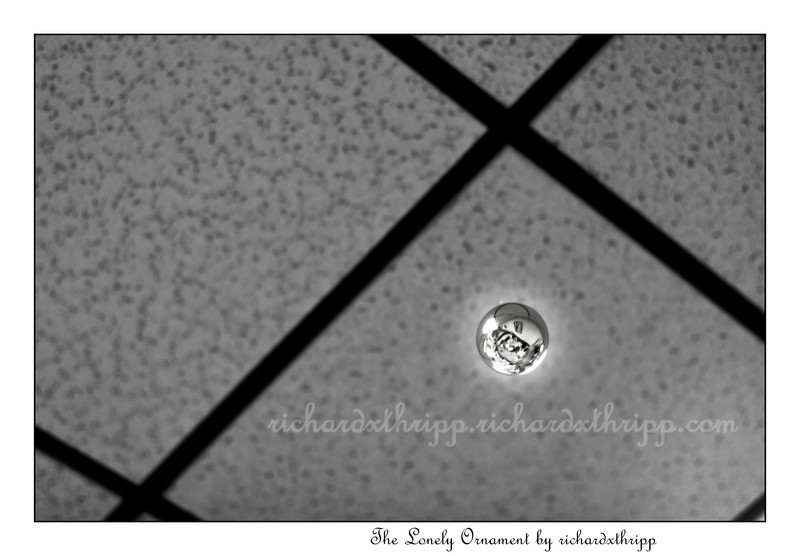
The Lonely Ornament — nobody loves you...

A lone ornament that I saw hanging from the ceiling at McDonald’s. Merry Christmas, everyone!

Buy a 4*6 copy for $0.95 (USA only). Lustre finish. After adding, go to your shopping cart.
Canon Rebel XTi, EF 50mm 1:1.4, 1/80, F2.2, 50mm, ISO200, 2007-12-16T08:09:00-05, 20071216-130900rxt

Download the high-res JPEG or download the source image (Canon Rebel XTi RAW file).
This work is licensed under a Creative Commons Attribution 3.0 License. Credit me as Richard X. Thripp and link here.

Post to Twitter Post to Bebo Post to Delicious Post to Digg Post to Facebook Post to FriendFeed Post to Google Buzz Send Gmail Post to LinkedIn Post to MySpace Post to Ping.fm Post to Reddit Post to Slashdot Post to Squidoo Post to StumbleUpon

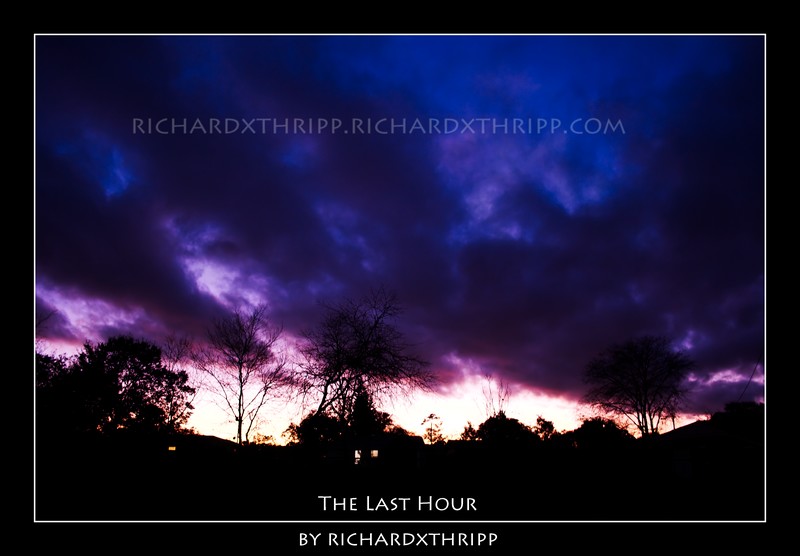
Photo: The Last Hour

By Richard X. Thripp at 2007-12-25T05:43:29Z in Photography, Shop, Stock Photos, with these tags: 4x6-lustre, canon rebel xti, dark, efs 18-55mm, evening, night, purple, sunsets, the last hour, 2 Comments. 44 words.

The Last Hour — a striking purple sunset

A beautiful purple sunset from our front yard. I used the kit lens because it’s the closest I have to wide-angle. Enjoy!

Buy a 4*6 copy for $0.95 (USA only). Lustre finish. After adding, go to your shopping cart.

Canon Rebel XTi, EFS 18-55mm, 1/4, F3.5, 18mm, ISO400, 2007-12-21T17:57:55-05, 20071221-225755rxt

Download the high-res JPEG or download the source image (Canon Rebel XTi RAW file).

This work is licensed under a Creative Commons Attribution 3.0 License. Credit me as Richard X. Thripp and link here.

Post to Twitter Post to Bebo Post to Delicious Post to Digg Post to Facebook Post to FriendFeed Post to Google Buzz Send Gmail Post to LinkedIn Post to MySpace Post to Ping.fm Post to Reddit Post to Slashdot Post to Squidoo Post to StumbleUpon

Monitor Calibration

By Richard X. Thripp at 2007-12-25T03:25:16Z in Photography Articles, with these tags: color management, pre-press, 5 Comments. 260 words.

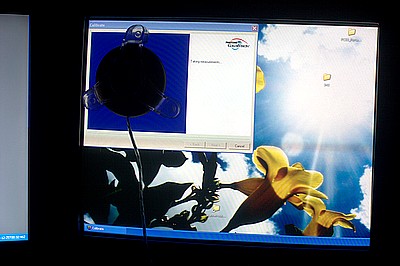
Monitor calibration in action.

I finally got around to getting a display colorimeter—an old ColorVision Spyder that only works with CRT monitors, which I found on eBay. I was pleased to find that my colors from calibrating by eye were accurate, though I had the brightness up too high. I do have a ViewSonic Q19wb widescreen monitor, but I don’t trust it to photo-editing as its colors are not near the accuracy of an old-fashioned CRT. A reviewer on Amazon.com sums it up well:

“Colors are not truly natural. But if you are looking for a big screen to browse Internet and not a photographer who is really concerned about colors, then this is a good buy.”

Unfortunately, while this one is considered low-end at about $150, the same can be said for most LCD monitors. Even after endlessly fiddling with the settings on my video card and LCD monitor, it still retains a bluish cast and clips the next-to-white colors in calibration charts. For $50, you can pick up a used CRT screen that will serve you better for photo-editing than most $500 LCDs, even in 2007.

Regardless of your monitor, display calibration is very important, because if the colors on your monitor aren’t standard, you can trust that they’ll be noticeably different when printed or displayed on other monitors. All the photos that you’ve carefully edited will have to be fixed once again if your screen was too blue, too bright, or off in some other way. Even if you don’t want to pay for hardware-based calibration, calibrate by eye, as it’s better than nothing.

Post to Twitter Post to Bebo Post to Delicious Post to Digg Post to Facebook Post to FriendFeed Post to Google Buzz Send Gmail Post to LinkedIn Post to MySpace Post to Ping.fm Post to Reddit Post to Slashdot Post to Squidoo Post to StumbleUpon

ShareThis   Printable Version      
More stuff:   On Exposure    Photo: Bits of Glass    Photo: At the Beach  

On Exposure

By Richard X. Thripp at 2007-12-23T18:21:14Z in Photography Articles, with these tags: exposure, guides, histogram, lighting, yellow sunshine, 3 Comments. 237 words.

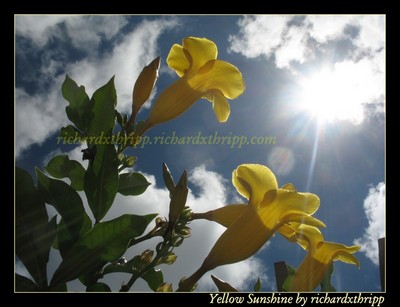
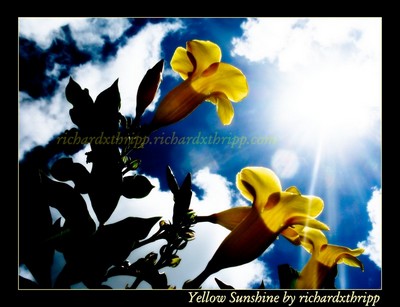
One thing about digital photography, a short-coming compared to film, is that you can’t recover from over-exposure (except somewhat using RAW format). So be sure to get it right the first time, because you can’t edit the detail back in. Note that in that photo, the white highlights in the sky aren’t actually clipped (if they were “clipped,” they’d be pure white), but if your monitor is too bright, you won’t be able to tell by sight. Same goes for you camera’s LCD screen. This is why you have the histogram (hopefully, anyway; I used to have a Fujifilm A360 camera that completely lacked it). If the bars trail off to the right, you know your photo has pure white areas (over-exposure), and if it continues to the left, you have pure black areas (under-exposure). If it does both, as it often will during mid-day, there is too much contrast in the scene. Usually, clipped shadows, like the ones in the black areas here, are more pleasing than clipped highlights. The sun (below) is an exception, as we expect it to be bright (same goes for the sky, but not in sky-centered photos like sunsets). The photo also has clipped shadows (the flower buds on the left), but it looks nice still. However, I increased the contrast carefully on the computer (the second image is the original); it wouldn’t look that good straight from the camera.

Yellow Sunshine (edited) Yellow Sunshine (source image)

Post to Twitter Post to Bebo Post to Delicious Post to Digg Post to Facebook Post to FriendFeed Post to Google Buzz Send Gmail Post to LinkedIn Post to MySpace Post to Ping.fm Post to Reddit Post to Slashdot Post to Squidoo Post to StumbleUpon


Page 1 of 212