
Disclaimer added 2014-10-03: I have not updated Tweet This since 2011-07-05 and lost interest in maintaining it. It has outstanding bugs and probably doesn’t even work work properly anymore due to changes to the Twitter API.
Download Tweet This 1.8.3 [0.8MB .zip]
Popular Twitter plugin inserts “Tweet This” links so your readers can share posts with one click. Can automatically tweet new posts via OAuth. Allows you to publish and schedule tweets from a new “Write Tweet” page. Supports 10 URL shorteners including Bit.ly, Su.pr, and TinyURL. Includes options for 20 social networks including Facebook, Bebo, and MySpace. Includes the Wickett Twitter Widget for your sidebar and many other options.
1.8.3: 2011-07-05: Small update to fix compatibility with WordPress 3.2.
Upgrading from 1.8.2 to 1.8.3
1. Upload the new /tweet-this/ folder over the old folder in your plugins folder.
2. Tweet This 1.8.3 is installed.
General Information
Tweeting a post on Twitter takes up a lot of space, because URLs quickly eat up your 140 characters. While your readers might copy the permalink, go to Bit.ly or TinyURL, shorten and copy the new URL, go to Twitter, and paste it into the status box, this plugin merges all that into one step.
This plugin makes short URLs like http:/example.com/?p=1234, then displays a link to Twitter for each post, with an optional icon (20 choices). This is done automatically for each post as needed. You can choose a URL shortener including Adjix.com, B2l.me, Bit.ly, Is.gd, Metamark.net, SnipURL.com, Su.pr, TinyURL.com, and Tweetburner.com. Each shortened URL is cached as a custom field in the postmeta table to keep load times fast. The cached records are updated or deleted as needed when you edit a post’s permalink, delete a post, change your site’s permalink structure, or change URL services. In WP 3.0 or later, Tweet This hooks the short URLs into the get_shortlink filter.
This plugin can also tweet new blog posts automatically, if you provide your Twitter credentials in the options. Then a “Send to Twitter” checkbox appears when writing a new post, along with a text box so you can change the tweet text for that specific blog post. As of 1.7, OAuth is used.
Unlike Tweetmeme, ShareThis, and other Twitter plugins, Tweet This inserts links without JavaScript, iFrames, or third-party dependencies. An example: http://twitter.com/home/?status=Example+Post+http://example.com/?p=1234
Copyright 2008 – 2011 Richard X. Thripp (email: richardxthripp@thripp.com)
Released under Version 2 of the GNU General Public License as published by
the Free Software Foundation, or, at your option, any later version.
Tweet This Version History
Tweet This Blogs
Tweet This Icons
Tweet This Wiki on Thripp.org
Tweet This on WordPress.org
Tweet This Installation
Before you begin, please make sure your server has PHP 5 and Curl enabled. While you can use Tweet This on PHP 4, all OAuth functions require PHP 5. Tweet This requires WordPress 1.5 minimum, with the following exceptions:
1. Importing exported options requires WP 2.0.
2. Automatic tweeting requires WP 2.7.
3. The Twitter Updates widget requires WP 2.8.
4. Adding short URLs to the get_shortlink filter requires WP 3.0.
5. Moving the Tweet This box around the Write Post page requires WP 3.0.
If you are installing Tweet This for the first time, follow these steps:
1. Upload the `tweet-this` folder to `/wp-content/plugins/`.
2. If you’re using WordPress MU and want this plugin active for all blogs, move `tweet-this.php` to `/wp-content/mu-plugins/` at this point.
3. Else, activate the plugin through the ‘Plugins’ menu in WordPress.
4. Tweet This icons should automatically appear on every post and page! Go to Settings > Tweet This to change settings and set up auto-tweets.
5. Optionally, delete readme.txt and the screenshots folder to save space.
Tweet This Donations
If you like Tweet This, consider donating $5.00, $10.00, or a larger amount via PayPal. As of Feb. 22, 2010, I have received $94 in donations since the initial release of Tweet This in Sept. 2008.
2011-02-22: $25.00 from Canopus Research Inc.
2011-02-17: $10.00 from Berend de Meyer.
2011-01-20: $5.00 from Nigel Boulton.
2010-10-27: $2.00 from JJ Soule.
2010-10-24: $10.00 from Linda C.
2010-10-20: $10.00 from Gareth Davies
2010-10-08: $1.00 from Tache Madalin
2010-10-01: $5.00 from Marcos Ramos
2010-09-20: $10.00 from Linda Worthington
2010-09-18: $1.00 from James Magary
2010-09-15: $10.00 from Miter Saw Reviews
2010-09-15: $5.00 from Kinoshita Communications LLC
Tweet This Screenshots

1. Tweet This options page: all sections closed.

2. Tweet This options page: all sections opened.
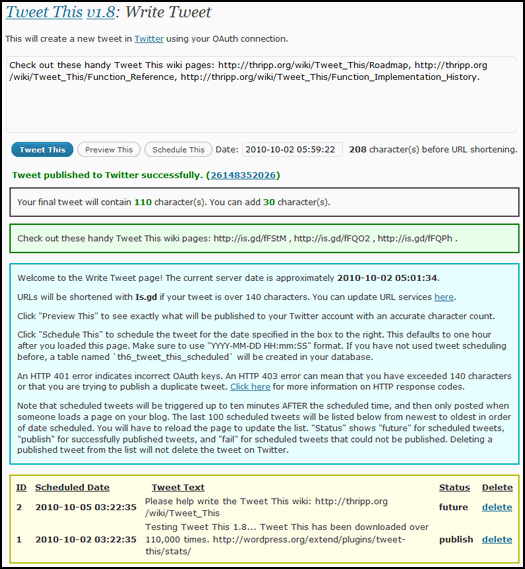
3. The Write Tweet page, having just published a tweet.
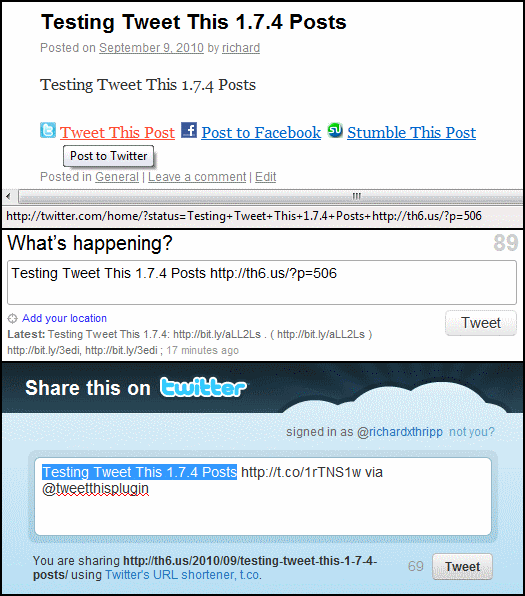
4. A post with Tweet This links; Twitter Web API and Share API.

5. Publishing a tweet alongside a new post.
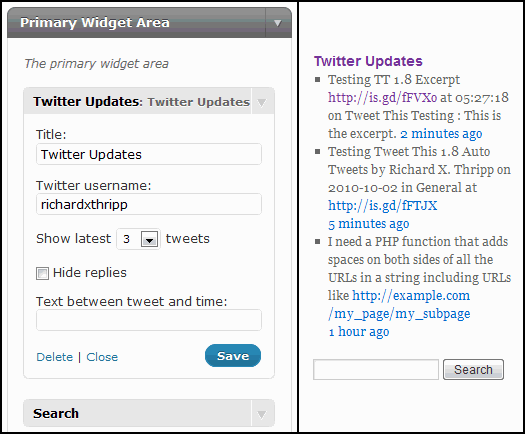
6. The Twitter Updates widget included with Tweet This.
Pingback: 10 Ways Twitter Will Change Blog Design in 2009 | THE ROXBURGH AGENCY
Pingback: Distance education and telecommuting can slow climate change | Richard Thripp's Website
Pingback: Lilienmeer.de » Problem mit den Feed
Hi Richard.
I have been trying for the past one hour to paste my access keys but getting an error response from tweeter OAuth saying
” Authentication failed, make sure your keys are entered correctly. ”
as i said i was doing it for the past hour ..please help
Thanks
Josef
Good evening…
As of 28 June the system is returning a 403 OAuth error when attempting to post. I am also getting a 410 error with the scheduled automatic tweets.
Tweet this (version 1.8.3) has stopped working in the last couple of days. Every auto-tweet now fails with:
Tweet failed. Twitter returned HTTP 301.
..however, on the Settings page, hitting the “Test Twitter OAuth”, it reports “Authentication succeeded, please save.”
I guess Twitter has made more breaking-changes to their API, and we need a new version of Tweet-This?
Hello Richard,
do you know whta this notice means, did we do something wrong?
Notice: Undefined index: tt_gmail in /mnt/webk/c1/28/52680628/htdocs/wp-content/plugins/tweet-this/tweet-this.php on line 1455
Pingback: 5 Twitter Plugins for WordPress | General | Dream Driven Web
For some reason, the twitter feed just isn’t working. It’s been installed correctly. My OAuth is valid. What am I missing?
Thanks
Looks like “Tweet This” stopped working (get 404 errors on Auto Tweeting new posts) some time in mid-October (about the time of latest major release of WordPress) – we didn’t notice until now and will have to switch to another similar tool I think. Too bad, it’s worked well for us up until now and I’m pretty sure we donated.
Hey there just wanted to give you a quick heads up and let you know a few
of the pictures aren’t loading correctly. I’m not sure why but I think its a
linking issue. I’ve tried it in two different internet browsers and both show the same outcome.
Hello:
I recently updated my Twitter Oauth settings withing my twitter account ..I inserted them into the “tweet this” setting page Word Press, and now I get this
“Tweet failed. Twitter returned HTTP 401”.
I have gone back and forth and have exhausted everything I know how and what to do..
whats the deal here!
Can you help me?
Thanks
Ralph
Hi Richard,
I have a problem with the plugin. I have been using it for years, but suddenly there is no text anymore in the tweet. It is only the link, no text.
Could you please advise?
Thanks,
Anton
hi Richard
the auto tweet function is not working. It is reporting a 404 error on add new/edit page. Any Ideas? OAuth is working fine
Cheers
Wayne
Hi Richard,
Was hoping you could help me out. I’m getting double tweets from auto post after making a change in the plugin to use the new API. One using the default URL/Title with the ‘New Blog Post:’ prefix and another using my custom changes made within the post itself.