My photos on the HTTP 500 Internal Server error page

I made a custom Internal Server Error page for the thripp.com network, with all the photos from my portfolio. Error pages are fun again. :smile:

I put a lot of ads there too, so I can monetize the outages. Plus, the links are to the photos on my jpgmag.com gallery, and all the thumbnails are on Photobucket, so the page is light-weight, won’t chew up bandwidth, and makes my photos accessible when the database is down. It’s only 10KB!

I posted this to digg too:

Check out this HTTP 500 page; instead of being rudely interrupted with a cryptic error message and an accusation that you broke the server, on thripp.com, you’re greeted by beautiful photography (and plenty of ads to boot).

Enjoy. :cool:

Doing the Unthinkable

By Richard X. Thripp at 2008-06-13T23:33:16 in Photography Ramblings, with these tags: changes, new, portfolio, richard x. thripp, 0 Comments.

I was looking around today, thinking “What one thing can I do on my website to make it a highly useful photography resource.” It didn’t take long. I decided and set out on releasing my entire portfolio as royalty-free stock images in their high-resolution glory, all free under the least restrictive Creative Commons license. If you’re any sort of digital artist, this is some awesome news, because I’ve literally put years into this stuff. You can do anything with them; even commercial stuff. All you have to do is credit me as Richard X. Thripp, and link back here at http://richardxthripp.thripp.com. Click here to see the complete gallery, or choose from some of the quick picks below:

Photo: Raindrops on the Window Photo: The Pale House Photo: In the Fog Photo: The Long and Winding Road Photo: The Silent Bouquet Photo: Glass Rain Photo: Real Beauty Photo: Red Candy

Thanks, and enjoy. Click “ShareThis” below and get the word out to your friends.

ShareThis   Printable Version     
More stuff:   My New Plan    Spamming Everyone    Everything is Stock  

My Photography Portfolio

By Richard X. Thripp at 2008-05-16T06:25:46 in Other, with these tags: portfolio, richard x. thripp, 0 Comments.

With the addition of Blue Marbles, I’ve now posted my complete photography portfolio here—a collection of thirty of my best works. Check it out here: richardxthripp.thripp.com/portfolio.

It’s on Digg too; you can vote for it to help get the word out.

Thanks!
Richard

Photo: Blue Marbles

Blue Marbles — shiny spheres in a line

The definitive photo of blue marbles. These marbles are my grandmother’s, and the yellow table I arranged them on is on her veranda. I get to take creative shots of them like this, of course. :grin: The evening light was just right, and while I originally intended to focus on the first marble, having the focus on the second is more nonconforming and gives a sense of depth. I went back into Photoshop today to revamp this February 2006 piece; my editing skills have improved, so I’m finding the above version especially likable.

Buy a 4*6 copy for $0.95 (USA only). Lustre finish. After adding, go to your shopping cart.

Fujifilm FinePix A360, 1/63, F2.8, 5.8mm, ISO64, 2006-02-22T17:49:43-05, 2006-02-22_17h49m43

Source image. I added contrast, removed color, and darkened the edges. Unfortunately the blues clip where the light is shining through the marbles, but I toned the colors down anyway, since subtlety is better than garishness, and because the brighter colors look bad in print. There was some dirt on the marbles and table I had to clone out, as always, but I left some on the table so it doesn’t look overly perfect. The finishing touches were to desaturate the yellow hues slightly, and to sharpen and brighten the second marble while blurring the rest of the image. The camera I was using at the time (a Fujifilm FinePix A360) would only focus to 2.4 inches; I got too close so the first one is blurry. I’m liking the depth of field in retrospect, as it seems like the natural choice with the further emphasis of the second marble.

More of the Blue Marbles series.

Free high-res stock image.

Photo: Pink and Purple Sunset 3

Pink and Purple Sunset 3 — a psychedelic, neon sky

The capstone of the series, despite nearing two years of age, Pink and Purple Sunset 3 maintains a permanent spot in my portfolio. It is beloved wherever I show it, though vocal few hate it, calling it as over-edited and “phony.” I don’t believe this; this is my photography, as is the work of a whole new generation theirs. Read The “Pure Photography” Myth for further discussion.

Buy a 4*6 copy for $0.95 (USA only). Lustre finish. After adding, go to your shopping cart.

Fujifilm FinePix A360, 1/2, F3.07, 6.8mm, ISO116, 2006-06-11T20:39:14-04, 2006-06-11_20h39m14

Source image. I’ve put more time into this photo than any other, as I strive for it to be perfect, which, for me, is to reveal no blemishes nor traces of editing, even under intense scrutiny. The contrast enhancements are high, but I did not need to shift the colors nor fabricate the clouds. The finished work you’ve seen is the third revision, the first being to remove the building on the right, the second for removing the tree on the left, and the final, only coming this month, to match the print gamut and clone out the remaining JPEG artifacts (which aren’t visible except in large copies). In the June 2006 release I’d already dramatized the colors and removed the pesky streetlights which cluttered the neighborhood, but with the finalized edits this can even be imagined as a scene out in the wilderness. If I ever doubted the value of RAW mode, I found it here; because in 2006 I only had a cheap digicam, this is a lossy JPEG. In bringing the colors out so dramatically, I struggled against compression artifacts and color banding, which would have been no issue if I’d shot it now in raw format with my Canon Rebel XTi. It is not in comparing JPEGs and raw files side-by-side that the choice becomes clear, but in the digital darkroom where the extra bits count, and the “invisible” JPEG compression becomes greatly magnified when you add darkness, saturation, or contrast. My solution for the artifacts was to clone them out by hand, a tedious process that I spent some three hours on. But if I’m working for my art, it’s always worth it.

More of the Pink and Purple Sunset series.
Free high-res stock image.

Photo: Leafy Sunset 6

Richard's picks:

Leafy Sunset 6 — silhouetted leaves and an orange evening sky

A stately orange sunset in my yard is the backdrop for silhouetted leaves of an American sycamore tree. Some of the leaves have been chewed by bugs; as you can see on the left. This only adds to the beauty, of course. :cool: There are even some raindrops on the leaves, left over from the storms earlier that day. I didn’t notice those till way after the shoot. This is the pinnacle of the Leafy Sunset series, trailing fifteen months after the fifth entry.

Buy a 4*6 copy for $0.95 (USA only). Lustre finish. After adding, go to your shopping cart.

Canon Rebel XTi, EFS 18-55mm, 1/40, F3.5, 18mm, ISO200, 2007-08-31T19:52:43-04, 2007-08-31_23h52m43

Source image. It was a challenge to get the colors and light gradations just right, but it was worth it for the result. As you can see from the original, I underexposed to keep the sunset’s highlights from being clipped in the red channel, knowing that the leaves would be pure black anyway. I finished this up in editing, by bringing up the colors without any clipping, and I made a shift from red to burnt orange, which I find more appealing, as is more easily printed.

More of the Leafy Sunset series.

Free high-res stock image.

Photo: Illumination

Illumination — a scary face lit up on black

My self portrait. Where there’s light, there’s darkness, and that darkness, surrounds me. I lit this with a bunch of cheap flashlights, using my camera’s timer. This is how I look after journeying into The Night of Eternal and Unrelenting Darkness. They’re really the same photo, if you look closely.

Buy a 4*6 copy for $0.95 (USA only). Lustre finish. After adding, go to your shopping cart.

Canon PowerShot A620, 1/15, F2.8, 7.3mm, ISO50, 2007-01-29T17:19:17-05, 2007-01-29_22h19m14

Source image. I removed blemishes, darkened a lot and added contrast, burned the edges of my face to make it more round, re-centered my face in the bottom-right third, and finally converted to black and white, with a bit of blue. The XY coordinate (512,332) in the above is RGB (18,16,21) now, where it should be (17,17,17) for black and white, for example. This adds subtle coldness, which is the best type, anyway.

Free high-res stock image.

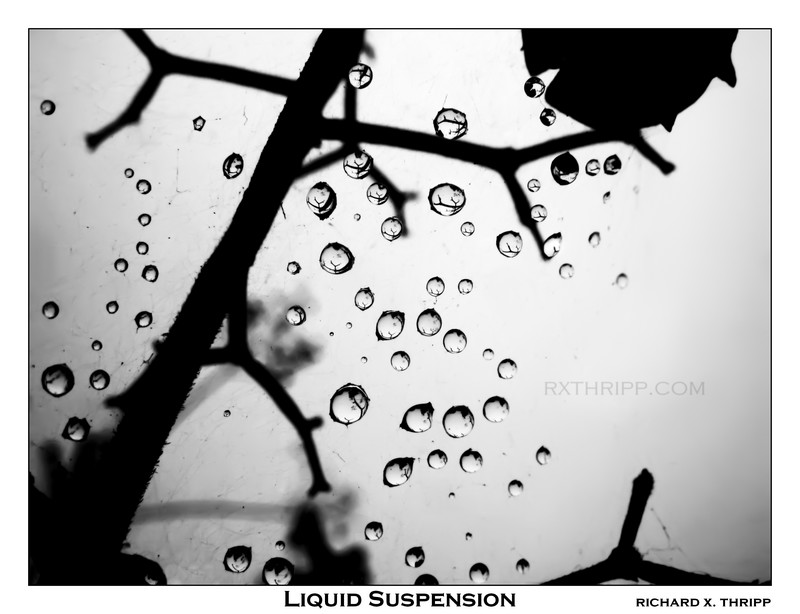
Photo: Liquid Suspension

Liquid Suspension — water droplets floating in a spider\'s web

Tiny raindrops, levitating in a spiderweb. Most people don’t realize it’s a spider’s web, but if you’re observant, you can figure it out from the stray dirt and threads. I shot this in January 2007 with my old Canon A620 (this is the first release here); I focused as close as it would go (one centimeter) for this, as the drops were really tiny. To increase the depth-of-field, I closed down to F7.1 (the range on the A620 is F2.8-F8). I kept taking photos after this, but disturbed the web mistakenly, causing all the drops to fall. This one, while dull at first, came to life with my editing. The reflections in the drops are my favorite element, each representing a microcosm of the world we know and love.

Buy a 4*6 copy for $0.95 (USA only). Lustre finish. After adding, go to your shopping cart.

Canon PowerShot A620, 1/320, F7.1, 7.3mm, ISO50, 2007-01-18T13:16:43-05, 2007-01-18_18h16m43

Source image. If you haven’t figured it out, spider webs aren’t pretty. There were pieces of dirt and dead bugs strewn in the web. My purpose as an artistic photographer is to present a realistic ideal of the world, through whatever means necessary. My job was to remove those, both from the web and the droplets’ reflections. I only did this in a couple; in the other droplets, I decided that the reflections pass for branches or leaves above or around the web. I used Adobe Photoshop CS2’s spot healing brush and clone stamp to take out the offending elements, while double checking that there were no smudge marks by making the image much darker using the Levels tool, followed by checking the integrity of the highlights. The last step was to crank the contrast into overdrive (curves), because the scene was really dull to start; it was a dreary, overcast day, after all. It all came together in the post-processing stage.

Free high-res stock image.

Photo: Speed

Speed — speeding down a city road at night

This is the second-anniversary edition of Speed, a photo I took from the passenger’s seat of a car in motion. We were moving at 30 miles per hour, but with the one-second exposure, the center is sharp but the edges are blurred. While I posted this on deviantART back in May 2006, I’ve added nice orange text, a border, and a bit more contrast to this revised version. The street is Derbyshire Road in Daytona Beach, Florida.

Buy a 4*6 copy for $0.95 (USA only). Lustre finish. After adding, go to your shopping cart.

The Call, an English band, put this photo on the cover of their album, Missing Pieces, from October 2007. I enjoy the songs, and though the band broke up last month (April 2008), they will be forever missed.

The photo-shoot for Speed

As you can see above, I took eight photos to get this one. All the others were blurry (camera shake), but I got the highlighted one just right by bracing the camera against the dashboard, and so it became Speed.

Fujifilm FinePix A360, 1″, F2.81, 5.8mm, ISO100, 2006-05-12T20:33:44-04, 2006-05-12_20h33m44

Source image. Darkening and slight contrast enhancements. This one didn’t need much.

Free high-res stock image.

ShareThis   Printable Version     
More stuff:   Source: Speed    Stock: Speed    8×10: Speed  

Photo: The Sky’s Ceiling

The Sky\'s Ceiling — blue raindrops on glass

Raindrops resting on a car’s moonroof. This is looking up from inside, so my title means that this is the glass ceiling in the sky, which the water rests on.

Buy a 4*6 copy for $0.95 (USA only). Lustre finish. After adding, go to your shopping cart.

Canon PowerShot A620, 1/60, F3.2, 7.3mm, ISO50, 2007-04-10T17:04:39-04, 2007-04-10_21h04m39

Source image. I was going to make this black and white, but prefered the blue tint for being reminiscent of rain. I added contrast and vignetting by burning in the corners.

Free high-res stock image.

Page 1 of 41234


Brilliant Photography is blog #2 & the time is UTC+0. Thanks for contributing to Thripp.com by Richard X. Thripp. Proudly powered by WordPress MU and protected by Akismet. The mission. Join the fun: create a blog!

deviantART, Digg, Facebook, JPG Magazine, LinkedIn, LiveJournal, MyShutterspace, StumbleUpon, photo.net, Twitter
Copyright © 2007-2008 Richard X. Thripp. Browse without photos.