The Temperature is -57, Says Google

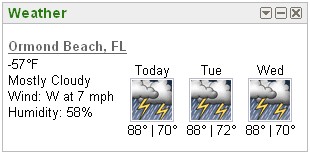
Logging on to my iGoogle page today, I see this:

my iGoogle page

Everything looks fine, right? But wait. Zoom in on the weather.

Florida is -57 F

I didn’t notice it was 89 degrees below freezing here! My goodness, my digits should be falling off. And in Central Florida, in the middle of summer. Very bizarre. Must be the effects of global warming.

This iGoogle “gadget” comes right from the horse’s mouth, and claims to have 12,203,943 users. I wonder for how many of them, the temperature drops 145 degrees at once. But for now, I’m back to sunny Florida’s 88°F.

Photo: The Graceful Flag

The Graceful Flag — a United States flag keeping still on a windless day

The stars and stripes fly low on a windless day. There was a nice background of clouds, so I shot this of the flag from the ground. I placed the pole off-center a bit, as that’s more appealing to the eye.

I added some contrast and color through curves.

Canon Rebel XTi, EF 50mm 1:1.4, 1/800, F7.1, 50mm, ISO100, 2008-06-12T11:14:07-04, 20080612-151407rxt

Download the high-res JPEG or download the source image.

This work is licensed under a Creative Commons Attribution 3.0 License. Please credit me as “Photo by Richard Thripp” or something similar.

Spamming Everyone

I was contemplating how to get the word out about the resource I’m developing here at Brilliant Photography. I decided to send an email to everyone know a.k.a. mass spamming. But it’s not spamming, because it’s relevant. I don’t know where the idea comes that messages that aren’t personalized are spam; do we expect the same from the newspaper, television, or even blog articles? Certainly not. Here’s the message, anyway. It outlines what I’m doing here quite well.

Hello everyone!

This is one of those super automated emails to everyone I’ve known over the past four years. I wanted to let you know the great progress I’ve been making at my website, Brilliant Photography by Richard X. Thripp, at http://richardxthripp.thripp.com/ . I’ve been working hard on my writing and photography, completing a portfolio of my 30 best images: clichés like roses, sunsets, raindrops, bugs, and still life. Mine are different because I always try to be sharp and innovative. I have a nice gallery section showing every photo I’ve ever posted, and I’m writing more informative articles on photography; stuff like How to Always Get the Perfect Shot, How to Use Zooming for Explosive Photos, How to Brand Your Prints, and my 4500-word novel, How to give file names to your photos, which arcs across photography, library science, cataloging theory, and the evils of Daylight Saving Time.

Two days ago, I was thinking "how could I make my website an even more useful resource?" It didn’t take long to think of it; I’ve done the unthinkable by releasing my entire portfolio (my life’s work, if you will) as a free stock resource. If you are a digital artist of any sort, or want a nice photo for a birthday card or to print for your wall, this is great news.

Though it’s a divergent topic, I’ve begun writing about personal development, because it fascinates me. I’ve also implemented affiliate advertising which generates revenue per click or purchase, in the case of the photography gear I sponsor. Someday, I will be able to support my passion full time, just from sharing it with the world on my website.

If you’d like to stay in the loop as I publish more photos and articles, you can subscribe by email here, or if you know about RSS feeds, add this one to your feed reader. I’ll be at http://richardxthripp.thripp.com/ forever, so you can also bookmark it or come back to this email when you’d like to see what I’m up to.

Thanks and happy travels. Send me an email back so we can keep in touch.
Richard

How to Always Get the Perfect Shot

There’s one technique that I’ve found useful, when you’re waiting for the perfect photography moment, to never miss it.

Snap so many shots, you can’t miss.

You’re bound to get a good shot of those falling raindrops if you take 50 photos instead of one. Now, there are a few pre-requisites. First, you have to have the shot well composed. The shutter speed must be adequate, and the exposure dead center. If you mess up this, you’ll just end up with 50 bad shots instead of one. Focus can be a problem, because the camera may change itself automatically between shots. Switch to manual focus once you’re locked in if possible, or keep your eyes peeled for blurriness through the viewfinder or on the LCD screen.

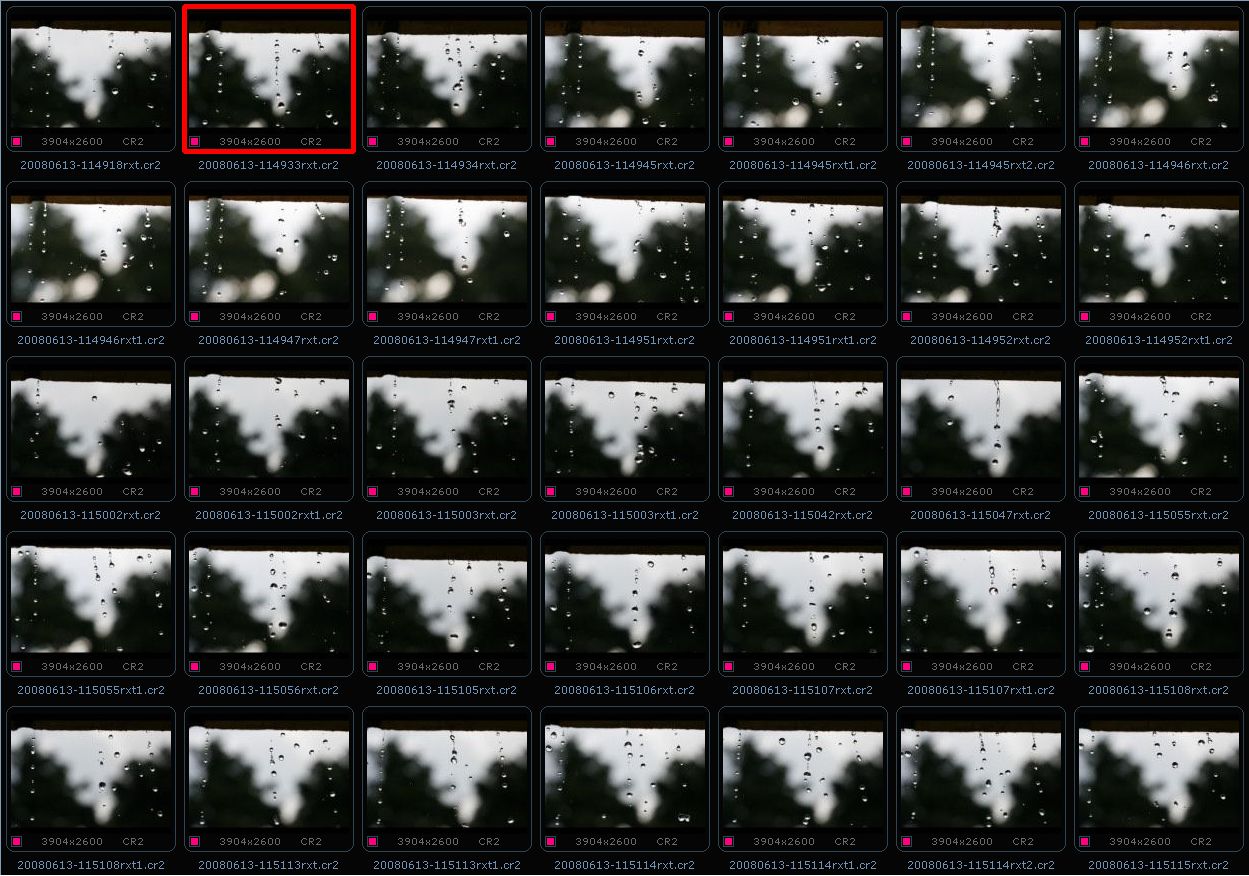
If you’re working with a digital compact, switch to burst or continuous shooting mode first. With a DSLR, you can just click away. Here’s an example of what I shot yesterday of raindrops on my front porch:

Overshooting in practice

Click to enlarge, and you can see I took no fewer than 35 distinct photos. All in a period of two minutes. But for something as chaotic as falling water, you need to do this to get the perfect moment. The masters in film photography did it despite the terrible expense, but the cost is nothing besides wear and tear on your camera in the digital age. You can delete all but the best afterward, but you won’t even get the best unless you shoot ten times more than what a normal person would.

As you can see above, my favorite was the second one. So why didn’t I just stop then? Because I had no idea what would come afterward. I just parked myself in the same space, and kept clicking away, because who knows what may appear? Perhaps the drops will form a heart shape, or collide with each other in mid-air?

If you really want to go overboard, you could film it instead, and then grab the best frame from the video. My Canon PowerShot A620 offers this. But a standard camcorder is only about 640×480 pixels, which is 0.3 megapixels (compare to 10 with my Canon Rebel XTi). The optics and picture quality are lower, and there are more compression artifacts. You won’t be able to freeze action with a 1/4000 second shutter speed like with my raindrops. And many frames will be blurry, because their meant to be watched in succession, not picked apart. An HD camcorder may be better. But overall, I don’t recommend it.

Generally, the higher-end your camera is, the bigger it’s storage buffer, so the quicker you can take shots. On my first camera in 2004, I could only take a shot every three seconds, max. But on my DSLR, I can shoot ten shots in five seconds, and then only wait a few seconds to take some more. And that’s in RAW mode. You want to use RAW mode if you can, because if there’s a problem with exposure or white balance, you can recover from it, and you have more editing leeway in general. But if your camera has a fast processor and you switch to JPEG, you may have a much larger buffer for burst shooting.

Now you know how to not miss the moment. You have to do this to get a good action shot; I’ve done it on all my best work, like Raindrops and Speed. Sometimes it takes dozens of shots. But if it’s a good scene, and you have the other factors right (exposure, focus, composition, aperture, shutter speed), then it will work and it’s the way to go.

Of course, you can’t even get the best shot if you don’t even have your camera at the ready. Read 8 Tips for the On-Cue Photographer for advice with that.

Photo: The Sun-Kissed Rose

The Sun-Kissed Rose — a pink rose under the noon sun

A bright pink rose under the noon-day sun. This is normally the worst time to take pictures; the sun was directly overhead. But it didn’t turn out half-bad here; all the light is on the flower, so the background is dark, and the petals are nicely highlighted. It does reveal the defects in the rose, but that gives an air of honesty and truthfulness… right? :grin:

There was a lot of dirt on this rose; small specks, but annoying still. I spent a lot of time with the spot healing brush in Photoshop to take them out. Next was to add contrast and blacken the background, and then I got the finished photo you see here.

Canon Rebel XTi, EF 50mm 1:1.4, 1/640, F3.5, 50mm, ISO100, 2008-04-23T12:37:07-04, 20080423-163707rxt

Download the high-res JPEG or download the source image.

This work is licensed under a Creative Commons Attribution 3.0 License. Please credit me as “Photo by Richard Thripp” or something similar.

How to Use Zooming for Explosive Photos

This is an interesting technique that I used in my latest photo, The Explosion. Simply, you zoom the lens as you take the photo, and you get some cool motion blur, no Photoshop required.

The Explosion — the world pops using zooming

Now, there are some concerns that you wouldn’t face with your normal photo, where the focal length stays constant through the exposure. Namely, these are:

• You can’t do it on most compacts, because the zoom is locked while taking the photo, as it’s controlled electronically. Using the method on a DSLR, where you turn the barrel yourself to zoom the lens, is usually the only option.
• You can’t do it with a prime lens (non-zooming), such as my favorite, the Canon EF 1:1.4. There’s just no zooming to be had.
• You need a slow shutter speed. It has to be fairly dark out, or in daytime, you have to close down the aperture as far as it goes, and maybe use a filter to keep more light out.
• With a slow shutter speed, you need a tripod. Camera shake does not look good, even in a zooming photo.
• Don’t try this with film, unless you want to waste a whole lot of film. Getting the process just right will take dozens of shots, and you’ll need to see what progress you’re making immediately to have any idea how to improve. This is really a place where digital shines.

To cut down the light, I screwed on a polarizing filter for the photo above, on the Canon Rebel XTi with the kit lens. It will work just fine; any 58mm circular polarizer will do for the lens. It cuts down about 1.5 stops of light (like F5.6 to F9.5), and makes the sky dark blue, depending on how you spin the ring. You can also cut down on light with a neutral density filter, though I haven’t tried one.

I opened up to F14 for The Explosion. Granted, I could’ve gone up to F22, but there wasn’t a need to. A 1/8 second exposure was plenty slow. I turned the timer on, held the camera down firmly with my left hand, and began zooming with my right just before the shutter tripped. That’s one thing you have to watch out for—it’s easy to jostle the camera while zooming, and it usually doesn’t look good because you won’t get a sharp center. So hold it down firmly.

Try over and over to get something cool-looking. Zoom slowly and just a little through exposure, quickly and over a wide range of focal lengths, zoom in steps rather than smoothly, and try different subjects. A simple subject works best. I zoomed at a moderate speed and evenly for the trees photo, and though it’s a complex subject, it draws the eye nonetheless. Try doing this on flowers, still life such as marbles or a baseball (I should’ve tried it with those), or even a highway (that’s motion blur, but zooming could’ve worked too).

Try starting zoomed out all the way, then zoom in. Then try zoomed half way to full telephoto, or wide-angle to medium. Next, go from telephoto to wide-angle (zoom out) as you expose; the world will look like it’s imploding rather than exploding.

An example of stepped zooming

The above is an example of stepped zooming. This was with a long exposure of 2.5 seconds; since it was dark and indoors, exposing for that long wasn’t a problem. The picture is of a door at the end of a hallway, with the light from outside flooding in from around the door. There’s a brightly lit door on the left also. Instead of zooming smoothly, I zoomed from 18mm to 55mm using the in nine steps over the period of the exposure. This gives the light a cool staggered effect. I did 30 similar shots and this was the best; it’s important for the line around the center of the door to be sharp for my purposes, meaning no motion blur. I put the camera on a milk crate and held it down myself, since I don’t own a tripod. You can improvise in the same way.

If you don’t have a zoom lens, you have a digital compact, or you just want to try something different, you can hold the camera steady while walking and get a similar effect; perhaps even better. It’s going to take a lot of tries and good luck, or a tripod on wheels or tracks to avoid other types of motion blur. I can see some cool results coming about if you try this in a hallway; maybe one at school or a hospital (and you’ll get quizzical looks from passersby).

This is a good technique to add to your arsenal, and I don’t see many people doing it. I’m sure you could work something similar in Photoshop, but getting it straight from the camera is much more fun.
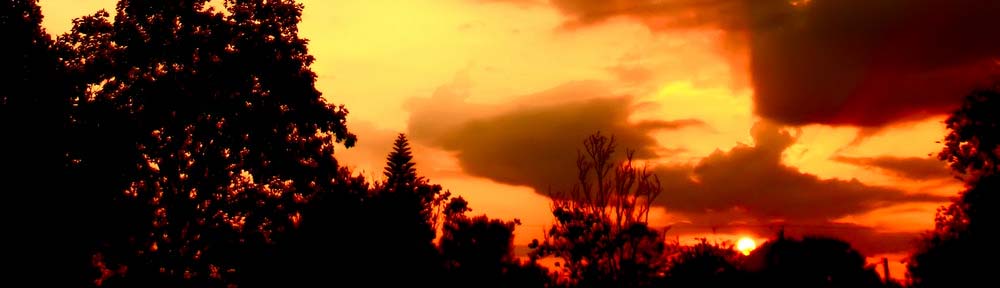
Photo: The Explosion

The Explosion — the world pops using zooming

This is a cool effect called zooming. While the photo is exposing and the shutter is tripped, you zoom the lens while keeping the camera steady. That way, the middle of the frame is sharp but the edges have cool motion blur. I used it here on some trees in my yard, and at the bottom you can see our clothes line (we avoid the dryer to save energy). It looks like the world is exploding!

Read more about the technique in How to Use Zooming for Explosive Photos.

Since the zoom effect is in-camera, there wasn’t much to edit here. I just added contrast and toned the colors a bit.

Canon Rebel XTi, EFS 18-55mm, 1/8, F14, 18mm, ISO100, 2008-04-20T18:30:51-04, 20080420-223051rxt

Download the high-res JPEG or download the source image.

This work is licensed under a Creative Commons Attribution 3.0 License. Please credit me as “Photo by Richard Thripp” or something similar.

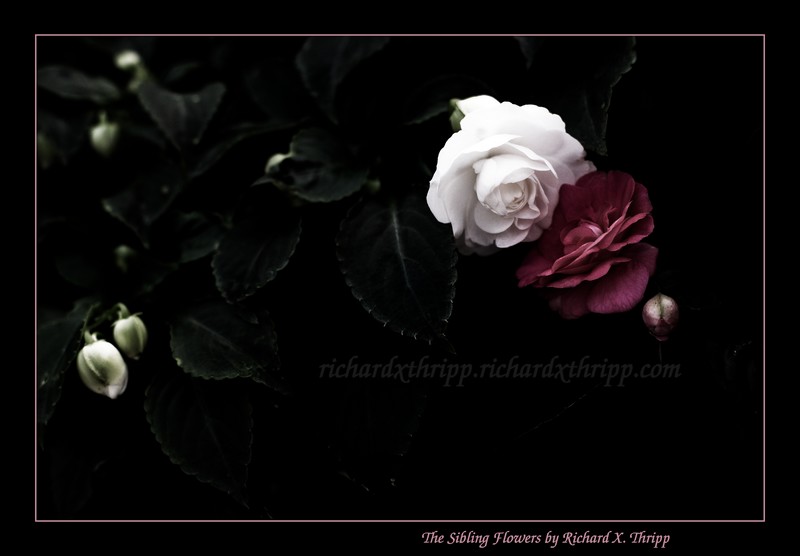
Photo: The Sibling Flowers

The Sibling Flowers — A red flower and a white flower together

A pair of flowers; one white, one deep red. I shot this at the garden section at Wal-Mart; the flowers were already close together, but I moved them closer. It’s a good combination. I got as close as my lens would focus to cut out the background.

I under-exposed compared to my camera’s meter on purpose, as it was blowing out the whites in the auto-exposure mode. In Photoshop, I desaturated everything, but left color in the red flower and a bit of green in the leaves. I didn’t go all the way to black and white, as I feel the green adds to the mood. Then, it was just a matter of darkening everything and adding in some contrast. I also cloned out distracting highlights at the top and burned the corners slightly.

Canon Rebel XTi, EF 50mm 1:1.4, 1/125, F3.5, 50mm, ISO400, 2008-05-04T18:54:55-04, 20080504-225455rxt

Download the high-res JPEG or download the source image.

This work is licensed under a Creative Commons Attribution 3.0 License. Please credit me as “Photo by Richard Thripp” or something similar.

Save What You Write

Whenever you write something, save it. If it’s worth writing, it’s worth keeping.

I’d been thinking of this as of late, so I created a page called My Comments. What do I put there? My comments, whenever I comment on a blog outside thripp.com. Why? Because I can’t trust I’ll ever see them again.

Don’t count on other people to preserve your work. This is all about independence. You may think you’ve just responded to some article with the greatest comment ever, but if the blog owner disagrees or just loves censorship, it’s one click of the delete button and your contribution is gone. Don’t you want to have what you write to refer to later? Then you can’t trust other people to hold the keys.

If you think this’ll never happen to you, or that it’s so rare that it doesn’t matter, then read The Profit Police and How They Kill Everyone. Even big and seemingly fair-minded communities will pull this on you, if you’ve violated one of their “policies.” It doesn’t matter if you’re adding a lot to the discussion. Good luck retrieving what you wrote (I was lucky my mini-articles were in Google’s cache).

I can promise that at thripp.com I don’t do this, but the same goes for any blogging community (WordPress.com, LiveJournal, whatever). Or social network, or email service, or anything you don’t control. Even my web host (Netfirms) says they can remove your site if it has “adult or illegal content.” But at least by being on my own domain, I can wrest control back from them, rather than building pagerank for deviantART, and then having to start all over when I feel limited by their services or am banned on a whim. I do backup my SQL database often, just in case.

If you trust the Google empire to your email, at least download Thunderbird and synchronize a copy on your hard drive through IMAP. I know I do. Gmail has lost email before. Who knows what could happen to yours?

This is just one step to claiming ownership of your life. When you give up your power, you give up your freedom, even if it’s in the name of convenience or safety. If you’re stuck renting an apartment, save up for a down payment on a house, even if you have to give up cable TV or air-conditioning or phone service. Don’t let the cycle continue. Be independent, take back your power.

New Feature: Richard’s Picks

I added something new today: posts throughout the site will display a random photography-related product from Amazon.com that I’ve chosen. I pick the products (cameras, lenses, accessories) if they have good reviews, are good quality, and priced reasonably, plus using my own experience in the field. They’re all displayed on the Richard’s Picks page (12 so far), and a random one shows next to the 2nd, 7th, and 10th post on each page. So you won’t see them on an individual post or page like this, but you will be seeing them on the home page, and tag and category listings, like the free stock photos section.

If you buy anything, I get a 4% commission from Amazon.com, which will help me support this site. I’ll get that bonus even for other things, so if you’re looking to make any sort of purchase from Amazon.com, click here to share with me. Thanks. :smile: