I’ve disappeared for the last few days because I’ve been working on The Thripp Public Library. While I can’t open it to the public yet (Dad won’t open our house to the world), I’m working on it now because I have time off and Dad’s generously donated lots of his books. Though I wanted to use Evergreen or Koha, I picked the simple and obscure OpenBiblio as my library system, because it’s the only thing I could find that would run on shared hosting. I was disappointed by the lack of features to start, but I’m starting to like the power and control with it, especially since the database makes sense, so adding new features is easy.
Before I even got started, the first step was to choose a barcoding format, classification system, and spine labeling format.
I don’t like Library of Congress (LC) classification because it’s arcane and confusing, so the Dewical Decimal system (DDC) was the default choice. But what to use it for? You can use it for everything, but I decided right away not to use it on fiction items, instead opting for “FICTION / *last name*” as the spine label and call number, which is the same as the Volusia County library system. It may not be ideal, but it’s much easier to use. Biographies are tougher. I chose DDC, but I put two lines above that say “BIO / *subject last name”. The DDC part is always “*numbers* *first three letters of the author’s last name*”. Large type items get “LT” at the top of the spine label. Spine labels == call numbers, always. I created a template file for spine labels in OpenOffice.org Writer, which I add to as I catalog books. Then when I get to twenty or thirty, I print out the whole sheet and start cutting them out with scissors and taping them to the books. Here’s part of a recent sheet:
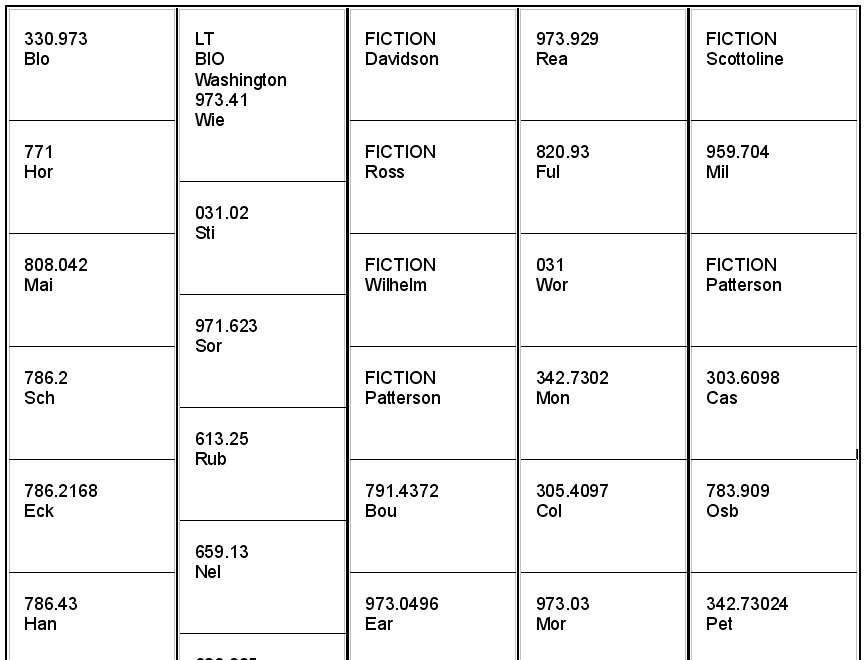
The numbers after the dot are sometimes six or more in Dewey Decimal classification. You can truncate (cut off) them, but I let them stay and just wrap the label around the book.
The next big step is barcoding. I don’t have a reader yet (too expensive), but it’s good to be ready ahead of time, and it gives a unique identifier for each item. Many libraries, including Volusia County, follow the format F LLLL XXXX XXXXC, where F is the flag, 2 for patrons or 3 for items, LLLL is the system identifier (2417 for Volusia), XXXX XXXX is an incremented number, and C is the check digit. The symbology is Codabar. This is nice, but the institutional identifiers are only useful if your part of a larger organization. I can’t find who oversees them, nor a list of each county / system and it’s code. If I picked one for my library, no one would respect it, plus it makes the barcodes unnecessarily long. So “normal” barcodes are out.
Codabar is old, and there’s no reason to use it if you aren’t follow the 14-digit format. So I picked the more robust Code 39. I looked in vain for open-source or free software that makes it easy to print up sheets of barcodes while generating the check digits, but gave up in disgust. I’m just doing it in OpenOffice.org Writer with this free Code 39 font. No check digits. My barcodes are only eight digits, and check digits aren’t needed anyway because the symbology is self-checking (so I’m told). Plus, forgoing check digits makes things much easier. I have a template of 5 pages with 20 barcodes each, numbered 1-100. When I want to print new ones, I can just find and replace every instance of “300300” with “300301” and it’s all done instantly. Here’s what that template looks like:
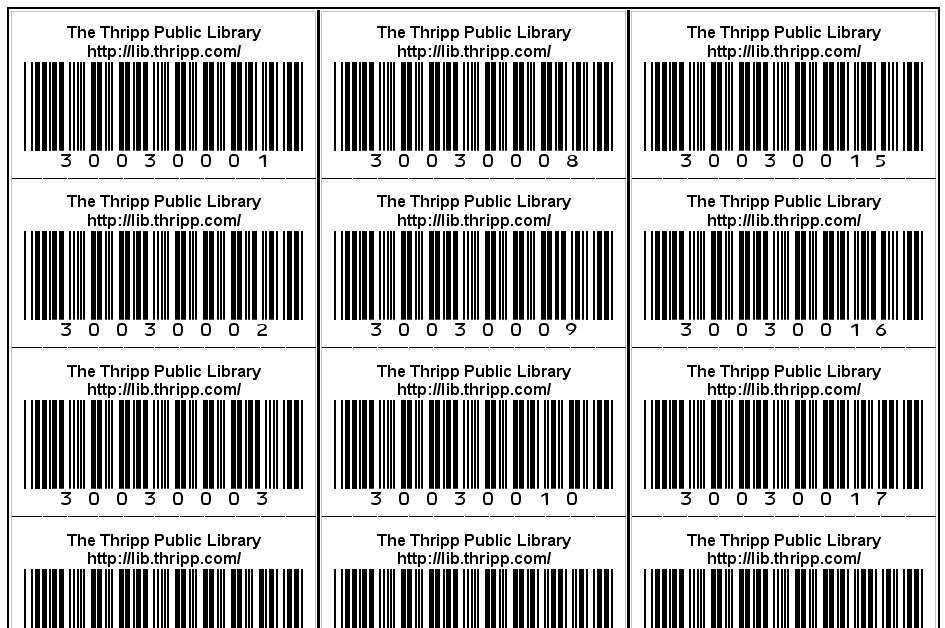
This is awesomely cool, and it is a robust solution, even if it seems too simple. I invite you to use this template to print similar barcodes. Make sure you have the font installed first, as this .odt document expects it. I just print these on card stock, cut them out with scissors, and affix them to the books with clear packing tape. I thought I had to decide to put the barcodes on the outside of the books or the inside… but I have the best of both worlds! I printed two copies of the template and put a barcode in both places. This way, I have the convenience of outside barcodes, but my items can still be identified if the barcodes peel off or the covers are destroyed. Clear tape over the barcode won’t matter for any scanner worth its salt. These barcodes are big and easy-to-scan too. I don’t know why most libraries use ones so small.
My numbering format is eight digits; two groups of four. The font doesn’t allow a space between them, but they are visually separated by the zeroes. I start patrons with 2 and items with 3 like traditional library barcodes. The format is 2001XXXX for patrons and 3003XXXX for items. So far I have 5 patrons and 81 items, so the highest patron barcode is 20010005, and for items, 30030081. When I get to 9999, I’ll go up to 2005 and 3007. There’s no reason the last 7 digits of patrons vs. items need to ever clash, and no overlap makes it easy to use abbreviated barcodes for internal memos.
A record number is created by OpenBiblio when you add an item. It’s just a numeric counter starting at one. The record number is used in OpenBiblio’s URLs, and is an easy identifier for my patrons to communicate to me. Barcodes are good too, but the problem is that they are transient, while record numbers are static (as long as I don’t delete the record). Also, the record number stands for the whole record, while a barcode is just for one item. There could be 10 copies of one item, but there still is one record number. So it makes sense to divorce barcodes from record numbers.
Of course, since I’m printing barcodes myself on a home laser printer, there’s no reason for barcodes to be transient. If a patron loses his library card, I just print up a new one on the spot with the same barcode. Same for damaged barcodes on books. But I can also replace the code with a new one if that’s quicker or easier for me, if I use record numbers as the unique identifier for the record (instead of the first barcode or nothing). While OpenBiblio makes similar numbers for patrons, mainly to distinguish them in the MySQL tables, I see no reason to use them. Each patron will only ever have one barcode. Even if I offer keychain library cards, they’ll have the same numbers as the big versions.
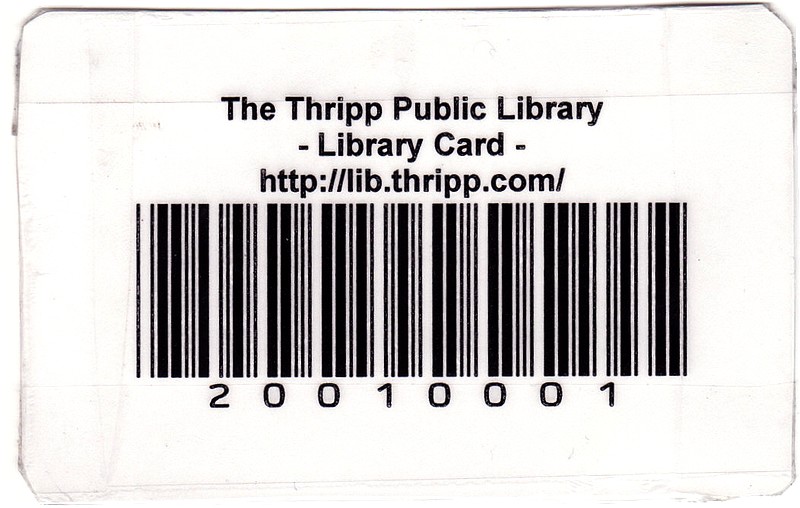
Before we go on to cataloging, let’s take a look at library cards. I took what I learned from item barcodes and applied it here. I made a cut-out template in my graphics software, which I’m using to overly text onto in OpenOffice.org. A sheet of library cards looks like this:
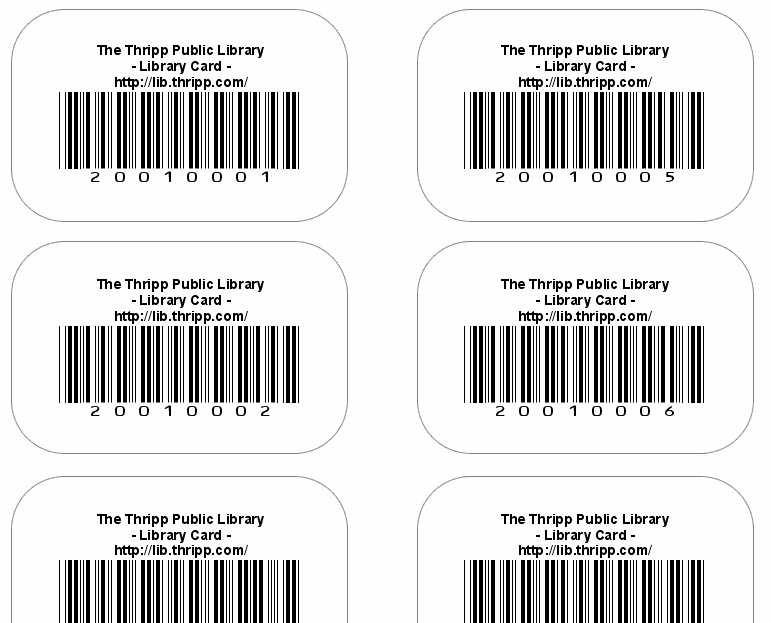
Here’s the library card template (font required). To change things, I right-click the background image, click Wrap > No Wrap, go to page 2 and change the numbers or other text, then go back to page one, right-click the image again, choose Wrap > In Background, then print. This is in OpenOffice.org 2.2.0. I haven’t upgraded to the new version, but it should be the same. To use them, I print them on card stock (a.k.a. matte photo paper), cut them out with scissors, then laminate them with packing tape (carefully). Of course I enter them into OpenBiblio too. I created custom fields under Admin > Member Fields, for alternate library cards, driver’s licenses, notes, and dates of birth. Those look like this:
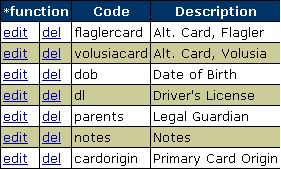
The logic with the alternate cards is this: a patron can get a card and add his Volusia and/or Flagler cards, so he can use those instead if he forgets his Thripp card. If he does that, I look him up by name because OpenBiblio won’t allow searching by custom fields (I may fix this later), and then approve the alternate card if the numbers match. Primary Card Origin is different; a patron can choose to use only his Volusia, Flagler, or other library card to identify himself in the Thripp system, in which case I can use the built-in barcode search on the third-party card, and the patron doesn’t even need a Thripp card. In that case, I type in the origin of the primary card in that special field (i.e. “Volusia”, “Flagler”, etc.).
Now that we have labels, barcodes, and cards out of the way, the next step is cataloging. I didn’t want to do all the work myself; instead I get some of the cataloging data from the Library of Congress. The problem with this is the LoC Lookup Patch won’t work with SYN Hosting because they won’t enable the PHP YAZ module because of security concerns. I tried the alternate LoC SRU, but I get this error:
Warning: fsockopen() [function.fsockopen]: unable to connect to z3950.loc.gov:7090 (Permission denied) in /home/richardx/public_html/lib/catalog/locsru_search.php on line 98
Notice: Socket error Permission denied (13) in /home/richardx/public_html/lib/catalog/locsru_search.php on line 125
I gave up on direct import and went to USMARC files. This was hard to figure out. The way to do it is to get MarcEdit 5.1. In the software, go to Add-ins > MarcEdit Z39.50/SRU Client, go to Modify Databases, click Add Database > Import from Master List, click the second in the list (Library of Congress), click Select Resource, go back to Search Mode, click Select Database, double-click Library of Congress, search for something, and double-click the item you want to import from the results. Then, click Download Record. Rinse and repeat, using the “Append” option. After you have, say, 30 records, go to Cataloging > Upload Marc Data back in OpenBiblio, and upload the files. It should say that 30 records are added, and then you can polish the data by searching and editing under Cataloging > Bibliography Search, book by book.
I edit the data to format the title my way, clear junk from the ISBN field, make the extent field a page counter, add the cover price as cost, and create the call number based on the Dewey Decimal code. Unfortunately there’s a lot of junk like “BOOKS” and “Copy 1” in the LoC Marc records, and I haven’t found a way to filter them out. I went through the MySQL database and cleared a lot of them recently.
This still saves me a lot of time, because coming up with the information myself would be too much work. The search doesn’t work well. If ISBN fails, I try title or author, or I go to the online search and get the control number to search by as “Record Number” in MarcEdit.
Sometimes there is no Dewey Decimal classification; just Library of Congress. I hunt down the item at another library in WorldCat to see what dot code they used. It’s easier than coming up with it on my own, and I wouldn’t get it right anyway.
As an alternate for when the Library of Congress has nothing, I installed the Amazon Lookup Module, which actually works. It just gets a few things like title, page count, publication date, author, and sometimes DDC code, but it helps.
Note that when I say “install,” this isn’t your typical WordPress plugin installation. This is getting down and dirty adding and editing pieces of code. Some modules are even distributed as hard-to-use-on-Windows .patch files, which scamper about editing two-dozen files in the OpenBiblio core. I’ve changed so much stuff, that when I upgrade to the next version, I’ll be merging the author’s changes with mine rather than mine with the author’s. It’s a completely different mindset.
Cataloging constructs are yours to set. Unfortunately, it’s rather inflexible because you have to work on a per-record basis, but this is expected with ILS’s. The standards are lower than with photo-cataloging software, because librarianship is considered a full-time job (time is cheap) and most libraries have fewer books than I have photos. I try to get things right the first time, meaning I use consistent formatting like putting a period at the end of the extended title and after the author’s name, keeping the ISBN field clean, using consistent capitalization, etc. This is a typical record. I let a lot of the Library of Congress’ stuff stay the same to save time, but the fields that I’m picky about are the ones that are shown in search results. Speaking of which…
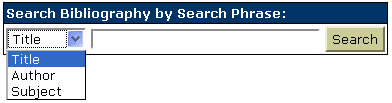
This is the default search system:
And this is mine:
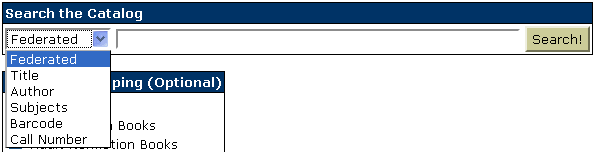
And mine has this, too:
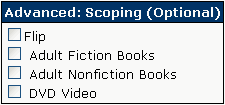
I realize no one knows what “federated” and “scoping” mean, but they’re such cool words I don’t care. You’ll learn it if you use my OPAC. OPAC stands for online public access catalog, for those of you not familiar with LIS jargon. LIS is library information science, and the OPAC is part of the ILS, or integrated library system. For scoping and federated search, I applied the Advanced Search by Title, Collection, Material Type .patch file using TortiseSVN, then modified it to fit my needs by removing the material type field (because it’s the same as collections in my library), changing “Search All” to “Federated,” and adding barcode and call-number search to it. This is an easy MySQL query addition, because the barcodes and call numbers are stored right in the biblio table in the database.
I like how the search works, because it matches partial words. I can type in “mel” as an author search, and I’ll get Typee by Herman Melville, which is the only book by him in my catalog right now. The Call Number search is good because I put useful data in the call number: “LT” for large type, “BIO” for biographies, “J DVD” for kids’ movies, “FICTION” for fiction, etc. So you can search by it. I haven’t figured out how to implement boolean queries yet, but what I have is pretty good.
This is the code behind the search. It’s in opac/index.php and shared/biblio_search.php, to be displayed below the search results so you can search again right from there. If you use it, do it after applying the patch I mentioned. This ASSUMES that you’re using mod_rewrite to change shared/biblio_search.php to search-results. Change action=”../search-results” to action=”../shared/biblio_search.php” on line 1 if the assumption is false.
<form name=”phrasesearch” method=”POST” action=”../search-results”>
<table class=”primary”><tr><th valign=”top” nowrap=”yes” align=”left”>Search the Catalog</td></tr><tr><td nowrap=”true” class=”primary”><select name=”searchType”>
<option value=”all” selected>Federated
<option value=”title”>Title
<option value=”author”>Author
<option value=”subject”>Subjects
<option value=”barcodeNmbr”>Barcode
<option value=”callnmbr”>Call Number
</select>
<input type=”text” name=”searchText” size=”55″ maxlength=”256″>
<input type=”hidden” name=”sortBy” value=”default”>
<input type=”hidden” name=”tab” value=”<?php echo H($tab); ?>”>
<input type=”hidden” name=”lookup” value=”<?php echo H($lookup); ?>”>
<input type=”submit” value=”Search!” class=”button”>
</td></tr></table><br /><table class=”primary”><tr><th valign=”top” nowrap=”yes” align=”left”>Advanced: Scoping (Optional)</td></tr><tr><font class=”small”><td nowrap=”true” class=”primary”><script type=”text/javascript” language=”JavaScript”>
function selectAll(ident) { var checkBoxes = document.getElementsByName(ident); for (i = 0; i < checkBoxes.length; i++) { if (checkBoxes[i].checked == true) { checkBoxes[i].checked = false; } else { checkBoxes[i].checked = true; } } }</script>
<input type=”checkbox” name=”selectall” value=”select_all” onclick=”selectAll(‘collec[]’);”>Flip<br /><?php $dmQ = new DmQuery(); $dmQ->connect(); $dms = $dmQ->get(“collection_dm”); $dmQ->close(); foreach ($dms as $dm) { echo ‘<input type=”checkbox” value=”‘.$dm->getCode().'” name=”collec[]”> ‘.H($dm->getDescription()).”<br />n”; } ?></td></tr></font></table></form>
I compressed some of it to one line, to make it really hard to read, because I like making things harder than necessary.  It makes it easy to scroll through in the file, and I shouldn’t need to change that part. If I do, I’ll just look through it carefully. It seems to make more sense to my brain than regular, fluffy code.
In shared/global_constants.php, I have this:
define(“OBIB_SEARCH_BARCODE”,”1″);
define(“OBIB_SEARCH_TITLE”,”2″);
define(“OBIB_SEARCH_AUTHOR”,”3″);
define(“OBIB_SEARCH_SUBJECT”,”4″);
define(“OBIB_SEARCH_NAME”,”5″);
define(“OBIB_SEARCH_ALL”,”6″);
define(“OBIB_SEARCH_CALLNMBR”,”7″);
The beginning of the search function in my classes/BiblioSearchQuery.php file looks like this:
function search($type, &$words, $page, $sortBy,
$collecs=array(), $materials=array(), $opacFlg=true) {
# reset stats
$this->_rowNmbr = 0;
$this->_currentRowNmbr = 0;
$this->_currentPageNmbr = $page;
$this->_rowCount = 0;
$this->_pageCount = 0;
# setting sql join clause
$join = “from biblio left join biblio_copy on biblio.bibid=biblio_copy.bibid “;
# setting sql where clause
$criteria = “”;
if ((sizeof($words) == 0) || ($words[0] == “”)) {
if ($opacFlg) $criteria = “where opac_flg = ‘Y’ “;
} else {
if ($type == OBIB_SEARCH_BARCODE) {
$criteria = $this->_getCriteria(array(“biblio_copy.barcode_nmbr”),$words);
} elseif ($type == OBIB_SEARCH_AUTHOR) {
$join .= “left join biblio_field on biblio_field.bibid=biblio.bibid ”
. “and biblio_field.tag=’700′ ”
. “and (biblio_field.subfield_cd=’a’ or biblio_field.subfield_cd=’b’) “;
$criteria = $this->_getCriteria(array(“biblio.author”,”biblio.responsibility_stmt”,”biblio_field.field_data”),$words);
} elseif ($type == OBIB_SEARCH_SUBJECT) {
$criteria = $this->_getCriteria(array(“biblio.topic1″,”biblio.topic2″,”biblio.topic3″,”biblio.topic4″,”biblio.topic5”),$words);
} elseif ($type == OBIB_SEARCH_ALL) {
$criteria =
$this->_getCriteria(array(“biblio.topic1″,”biblio.topic2″,”biblio.topic3”,
“biblio.topic4″,”biblio.topic5”,
“biblio.title”,”biblio.title_remainder”,
“biblio.author”,”biblio.responsibility_stmt”,
“biblio.call_nmbr1″,”biblio.call_nmbr2″,”biblio.call_nmbr3″,”biblio_copy.barcode_nmbr”),$words);
} elseif ($type == OBIB_SEARCH_CALLNMBR) {
$criteria = $this->_getCriteria(array(“biblio.call_nmbr1″,”biblio.call_nmbr2″,”biblio.call_nmbr3”),$words);
} else {
$criteria =
$this->_getCriteria(array(“biblio.title”,”biblio.title_remainder”),$words);
}
And finally, this is the code that interprets the posted data, in shared/biblio_search.php:
#****************************************************************************
#* Retrieving post vars and scrubbing the data
#****************************************************************************
if (isset($_POST[“page”])) {
$currentPageNmbr = $_POST[“page”];
} else {
$currentPageNmbr = 1;
}
$searchType = $_POST[“searchType”];
$sortBy = $_POST[“sortBy”];
if ($sortBy == “default”) {
if ($searchType == “author”) {
$sortBy = “author”;
} else {
$sortBy = “title”;
}
}
$searchText = trim($_POST[“searchText”]);
# remove redundant whitespace
$searchText = eregi_replace(“[[:space:]]+”, ” “, $searchText);
if ($searchType == “barcodeNmbr”) {
$sType = OBIB_SEARCH_BARCODE;
$words[] = $searchText;
} else {
$words = explodeQuoted($searchText);
if ($searchType == “author”) {
$sType = OBIB_SEARCH_AUTHOR;
} elseif ($searchType == “subject”) {
$sType = OBIB_SEARCH_SUBJECT;
} elseif ($searchType == “all”) {
$sType = OBIB_SEARCH_ALL;
} elseif ($searchType == “callnmbr”) {
$sType = OBIB_SEARCH_CALLNMBR;
} else {
$sType = OBIB_SEARCH_TITLE;
}
}
// limit search results to collections and materials
$collecs = array();
if (is_array($_POST[‘collec’])) {
foreach ($_POST[‘collec’] as $value) {
array_push($collecs, $value);
}
}
$materials = array();
if (is_array($_POST[‘material’])) {
foreach ($_POST[‘material’] as $value) {
array_push($materials, $value);
}
}
Notice that I added CALLNMBR and BARCODE search, the logic for which was enumerated in classes/BiblioSearchQuery.php. It’s a good feature for my patrons to find an on-hand item in the OPAC, and for me it’s especially helpful.
I revamped OpenBiblio’s search results. A typical result looks like this:

Compare to the old style:

Notice all the new stuff in the top image? The link is bold. The extended title is below. No more small text. Material is gone (my collections’ titles make it self-evident). The record number is shown. The call number is important, so it’s bolded purple, and on the same line as the collection to save space. On Shelf status is bold and green; a great visual cue. It’s not “checked in” anymore, it’s the more sensible “On Shelf”. I changed that right in the database, in the biblio_status_dm table. Most importantly, do you notice the wonderful info line? Everything you could ever want to know is right there. It’s year / ISBN / pages or minutes / cost / Amazon.com link / # of circulations. That really puts a lot of power into the hands of your patrons.
I wrote/modified the code for my set-up, so you’ll have to change some things if you want to use it. This goes in shared/biblo_search.php, above the footer. Here it is:
<tr>
<td nowrap=”true” class=”primary” valign=”top” align=”center” rowspan=”2″>
<?php echo H($biblioQ->getCurrentRowNmbr());?>.<br />
<a target=”_blank” href=”http://lib.thripp.com/<?php if ($tab == “cataloging”) echo “e/”.HURL($biblio->getBibid()); else echo HURL($biblio->getBibid());?>”>
<img src=”../images/<?php echo HURL($materialImageFiles[$biblio->getMaterialCd()]);?>” width=”20″ height=”20″ border=”0″ align=”bottom” alt=”<?php echo H($materialTypeDm[$biblio->getMaterialCd()]);?>”></a>
</td>
<td class=”primary” valign=”top” colspan=”2″>
<table class=”primary” width=”100%”>
<tr>
<td class=”noborder” width=”1%” valign=”top”><strong><?php echo $loc->getText(“biblioSearchTitle”); ?>:</strong></td>
<td class=”noborder” colspan=”3″><strong><a target=”_blank” href=”http://lib.thripp.com/<?php if ($tab == “cataloging”) echo “e/”.HURL($biblio->getBibid()); else echo HURL($biblio->getBibid());?>”><?php echo H($biblio->getTitle());?></a></strong>
<?php $bid = HURL($biblio->getBibid());
$getxtitle = mysql_query(“SELECT title_remainder FROM biblio WHERE bibid = ‘$bid'”) or die(mysql_error());
$printxtitle = mysql_fetch_row($getxtitle);
if ($printxtitle[0] == “”) echo “”; else echo “<br />$printxtitle[0]”; ?></td>
</tr>
<tr>
<td class=”noborder” valign=”top”><strong><?php echo $loc->getText(“biblioSearchAuthor”); ?>:</strong></td>
<td class=”noborder” colspan=”3″><?php if ($biblio->getAuthor() != “”) echo H($biblio->getAuthor());?></td>
</tr>
<tr>
<td class=”noborder” valign=”top” nowrap=”yes”><strong>Ref. #<?php echo HURL($biblio->getBibid()); ?>:</strong></td>
<td class=”noborder” colspan=”3″><?php echo H($collectionDm[$biblio->getCollectionCd()]);?> / <strong><font color=”#640064″><?php echo H($biblio->getCallNmbr1().” “.$biblio->getCallNmbr2().” “.$biblio->getCallNmbr3()); ?></font></strong></td></tr><tr><td class=”noborder” valign=”top”><strong>Info:</strong></td><td class=”noborder” colspan=”3″>
<?php // RXT 20080723 code:
$bid = HURL($biblio->getBibid());
$getyear = mysql_query(“SELECT field_data FROM biblio_field WHERE tag = ‘260’ AND subfield_cd = ‘c’ AND bibid = ‘$bid'”)
or die(mysql_error());
$getisbn = mysql_query(“SELECT field_data FROM biblio_field WHERE tag = ’20’ AND subfield_cd = ‘a’ AND bibid = ‘$bid'”)
or die(mysql_error());
$getpages = mysql_query(“SELECT field_data FROM biblio_field WHERE tag = ‘300’ AND subfield_cd = ‘a’ AND bibid = ‘$bid'”)
or die(mysql_error());
$getminutes = mysql_query(“SELECT field_data FROM biblio_field WHERE tag = ’20’ AND subfield_cd = ‘c’ AND bibid = ‘$bid'”)
or die(mysql_error());
$getcost = mysql_query(“SELECT field_data FROM biblio_field WHERE tag = ‘541’ AND subfield_cd = ‘h’ AND bibid = ‘$bid'”)
or die(mysql_error());
$getamz = mysql_query(“SELECT field_data FROM biblio_field WHERE tag = ‘970’ AND subfield_cd = ‘a’ AND bibid = ‘$bid'”)
or die(mysql_error());
$printyear = mysql_fetch_row($getyear);
$printisbn = mysql_fetch_row($getisbn);
$printpages = mysql_fetch_row($getpages);
$printminutes = mysql_fetch_row($getminutes);
$printcost = mysql_fetch_row($getcost);
$printamz = mysql_fetch_row($getamz);
if ($printyear == “”) echo “Year Unknown”;
else echo $printyear[0];
echo ” / “;
if ($printisbn == “”) echo “ISBN Unavailable”;
else echo “ISBN: “.$printisbn[0];
if ($printpages == “”) echo “”;
else echo ” / “.$printpages[0];
if ($printminutes == “”) echo “”;
else echo ” / “.$printminutes[0];
echo ” / $”.$printcost[0];
if ($printamz == “Not on Amazon.com”) echo “”;
elseif ($printamz != “”) echo ” / <a target=”_blank” href=”http://www.amazon.com/exec/obidos/ASIN/”.$printamz[0].”/brilliaphotog-20″ title=”See this item on Amazon.com”>Amazon.com</a> / “;
elseif ($printisbn != “”) echo ” / <a target=”_blank” href=”http://www.amazon.com/exec/obidos/ASIN/”.$printisbn[0].”/brilliaphotog-20″ title=”See this item on Amazon.com”>Amazon.com</a> / “;
else echo ” / “;
$getCircs = mysql_query(“SELECT COUNT(bibid) FROM biblio_status_hist WHERE bibid = ‘$bid'”) or die(mysql_error());
$getCircsRes = mysql_fetch_row($getCircs); if ($getCircsRes[0] == ‘1’) echo ” (1 circ)”; else echo ” ($getCircsRes[0] circs)”; ?>
</td></tr></table></td></tr>
<?php
if ($biblio->getBarcodeNmbr() != “”) {
?>
<tr>
<td class=”primary” ><strong><?php echo $loc->getText(“biblioSearchCopyBCode”); ?></strong>: <?php echo H($biblio->getBarcodeNmbr());?>
<?php if ($lookup == ‘Y’) { ?>
<a href=”javascript:returnLookup(‘barcodesearch’,’barcodeNmbr’,'<?php echo H(addslashes($biblio->getBarcodeNmbr()));?>’)”><?php echo $loc->getText(“biblioSearchOutIn”); ?></a> | <a href=”javascript:returnLookup(‘holdForm’,’holdBarcodeNmbr’,'<?php echo H(addslashes($biblio->getBarcodeNmbr()));?>’)”><?php echo $loc->getText(“biblioSearchHold”); ?></a>
<?php } ?>
</td>
<td class=”primary” ><strong><?php echo $loc->getText(“biblioSearchCopyStatus”); ?></strong>: <?php $status = H($biblioStatusDm[$biblio->getStatusCd()]); if ($status == ‘On Shelf’) echo “<strong><font color=”#009900″>On Shelf</font></strong>”; elseif ($status == ‘On the Shelving Cart’) echo “<strong><font color=”#FF8000″>On the Shelving Cart</font></strong>”; else echo “<strong><font color=”#FF0000″>$status</font></strong>”; ?></td>
</tr>
<?php } else { ?>
<tr>
<td class=”primary” colspan=”2″ ><?php echo $loc->getText(“biblioSearchNoCopies”); ?></td>
</tr>
<?php
}
}
}
$biblioQ->close();
?>
</table><br />
<?php printResultPages($loc, $currentPageNmbr, $biblioQ->getPageCount(), $sortBy); ?>
This code assumes you’re using mod_rewrite to create friendly permalinks, in the format of YOURSITE/BIBID and YOURSITE/e/BIBID for the cataloging section. I’ll tell you how later in the article. It also assumes your site is http://lib.thripp.com and your Amazon.com affiliate code is brilliaphotog-20. Change the first one definitely. Leave the second alone if you want to donate to me.
This code also makes the assumption that your using my cataloging methods I defined earlier (year field, ISBN, pages are clean, etc.). For DVDs to show the minute count instead of pages, the number MUST be in “Terms of availability:”, which is the field I chose. You can change it easily if you examine the database structure and modify the code to fit your methods. The code defines the Amazon.com ASIN as the text in the ISBN field of the record, so your ISBN fields MUST be ISBN-10 and MUST be clean (no “(pbk.)” after the numbers). I’ve defined a contingency method: create a Marc field with tag 970, subfield a, with the ASIN if it differs from the ISBN or there is no ISBN. That will be used instead. If you enter “Not on Amazon.com” as the Marc field, no Amazon.com link will show even if there is an ISBN.
“On Shelf” statuses are shown in bold green, “On the Shelving Cart” is bold orange, and everything else is bold red. Make sure to change the statuses to those in the biblio_status_dm table, or do the opposite in the code. The number of circs includes checkouts and renewals for all copies attached to the record, past and present. Links open in new windows (I added target=”blank”). This is because the search results page uses POST data instead of URL parameters, so opening in the same window and clicking back prompts a warning. I wish it used URL parameters instead.
I like my search results format. It’s a lot more useful than what I see at most libraries.
I also upgraded shared/biblio_view.php to this:
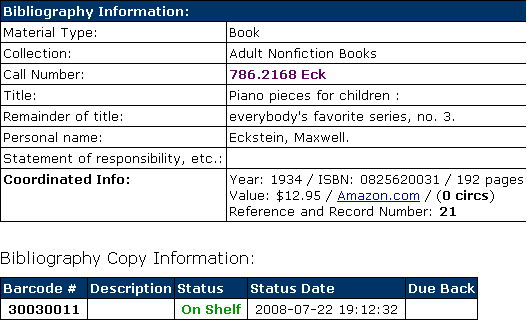
A typical record before would be this:

Examples for the old style are from the Frances D. Still Learning Center OPAC. They use a stock OpenBiblio install. Nearing 3000 items. OpenBiblio scales failry well.
The code for the record view page is mostly copied from the search results page, so I won’t copy it for brevity.
I created a robust statistics system on the home page, which goes around aggregating numbers in the database so that it’s always up-to-date. It has one huge flaw: it assumes each record has one and only one item. Mine do, so it isn’t a problem, but I’ll have to re-work it when that changes.
The code requires you to create config.php and global.php in the OpenBiblio root. config.php should look like this:
<?php unset($config);
$config = array();
$config[‘db_hostname’] = “localhost”;
$config[‘db_port’] = “3306”;
$config[‘db_username’] = “yourDBusername”;
$config[‘db_password’] = “yourDBpassword”;
$config[‘db_name’] = “yourDBname”; ?>
Replace the database details with your own above, then make global.php exactly as below:
<?php function db_connect() { global $config; mysql_connect($config[‘db_hostname’].”:”.$config[‘db_port’], $config[‘db_username’], $config[‘db_password’]) or die(mysql_error()); mysql_select_db($config[‘db_name’]) or die(mysql_error()); } ?>
Finally, this huge block powers the statistics:
<p>
<?php require(“../config.php”); require(“../global.php”); db_connect();
$cCount = mysql_query(“SELECT COUNT(copyid) FROM biblio_copy”) or die(mysql_error());
$cCountRes = mysql_fetch_row($cCount);
$cPrice = mysql_query(“SELECT SUM(field_data) FROM biblio_field WHERE tag = ‘541’”) or die(mysql_error());
$cPriceRes = mysql_fetch_row($cPrice);
$cPages = mysql_query(“SELECT SUM(field_data) FROM biblio_field WHERE tag = ‘300’ AND subfield_cd = ‘a'”);
$cPagesRes = mysql_fetch_row($cPages);
$cNonFic = mysql_query(“SELECT COUNT(bibid) FROM biblio WHERE collection_cd = ‘2’”);
$cNonFicRes = mysql_fetch_row($cNonFic);
$cFic = mysql_query(“SELECT COUNT(bibid) FROM biblio WHERE collection_cd = ‘1’”);
$cFicRes = mysql_fetch_row($cFic);
$cDVDs = mysql_query(“SELECT COUNT(bibid) FROM biblio WHERE collection_cd = ’12′”);
$cDVDsRes = mysql_fetch_row($cDVDs);
$cOut = mysql_query(“SELECT COUNT(status_cd) FROM biblio_copy WHERE status_cd = ‘out'”) or die(mysql_error());
$cOutRes = mysql_fetch_row($cOut);
$cIn = mysql_query(“SELECT COUNT(status_cd) FROM biblio_copy WHERE status_cd = ‘in'”) or die(mysql_error());
$cInRes = mysql_fetch_row($cIn);
$circOuts = mysql_query(“SELECT COUNT(copyid) FROM biblio_status_hist WHERE status_cd = ‘out'”) or die(mysql_error());
$circOutsRes = mysql_fetch_row($circOuts);
$circRens = mysql_query(“SELECT COUNT(copyid) FROM biblio_status_hist WHERE status_cd = ‘crt'”) or die(mysql_error());
$circRensRes = mysql_fetch_row($circRens);
$circTotal = mysql_query(“SELECT COUNT(copyid) FROM biblio_status_hist”) or die(mysql_error());
$circTotalRes = mysql_fetch_row($circTotal);
$pTotal = mysql_query(“SELECT COUNT(mbrid) FROM member”) or die(mysql_error());
$pTotalRes = mysql_fetch_row($pTotal);
$pTotalAdults = mysql_query(“SELECT COUNT(classification) FROM member WHERE classification = ‘1’”) or die(mysql_error());
$pTotalAdultsRes = mysql_fetch_row($pTotalAdults);
$pTotalChildren = mysql_query(“SELECT COUNT(classification) FROM member WHERE classification = ‘2’”) or die(mysql_error());
$pTotalChildrenRes = mysql_fetch_row($pTotalChildren);
$pPhones = mysql_query(“SELECT COUNT(mbrid) FROM member WHERE home_phone != ””) or die(mysql_error());
$pPhonesRes = mysql_fetch_row($pPhones);
$pEmails = mysql_query(“SELECT COUNT(mbrid) FROM member WHERE email != ””) or die(mysql_error());
$pEmailsRes = mysql_fetch_row($pEmails);
$cAllBooks = ($cFicRes[0]+$cNonFicRes[0]);
echo “<strong>Live Statistics:</strong><br />
The Thripp Public Library has <strong>$pTotalRes[0]</strong> patrons: <strong>$pTotalAdultsRes[0]</strong> adults and <strong>$pTotalChildrenRes[0]</strong> children.<br />
There are <strong>”.$cCountRes[0].”</strong> items: <strong>”.$cNonFicRes[0].”</strong> nonfiction books, <strong>”.$cFicRes[0].”</strong> fiction books, and <strong>”.$cDVDsRes[0].”</strong> DVDs.<br />
Stats: Nonfiction books: <strong>”; printf (“%01.2f”,(($cNonFicRes[0]/$cCountRes[0])*100)); echo “%</strong>; Fiction books: <strong>”; printf (“%01.2f”,(($cFicRes[0]/$cCountRes[0])*100)); echo “%</strong>; DVDs: <strong>”; printf (“%01.2f”,(($cDVDsRes[0]/$cCountRes[0])*100)); echo “%</strong>.<br />
<strong>”; if ($cOutRes[0] == ‘1’) echo “1</strong> item is”; else echo “$cOutRes[0]</strong> items are”; echo ” checked out and <strong>”.$cInRes[0].”</strong> are on shelf.<br />
<strong>”; printf (“%01.2f”,(($cOutRes[0]/$cCountRes[0])*100)); echo “%</strong> of the catalog is checked out. The average patron has <strong>”; printf (“%01.2f”,($cOutRes[0]/$pTotalRes[0])); echo “</strong> items out.<br />
There are <strong>”; printf (“%01.2f”,($cCountRes[0]/$pTotalRes[0])); echo “</strong> items for every <strong>1</strong> patron.<br />
The collection is worth <strong>$$cPriceRes[0]</strong>, or about <strong>$”; printf (“%01.2f”,($cPriceRes[0]/$cCountRes[0])); echo “</strong> per item.<br />
There have been <strong>$circOutsRes[0]</strong> checkouts and <strong>$circRensRes[0]</strong> renewals; a total of <strong>$circTotalRes[0]</strong>.<br />
This is an average of <strong>”; printf (“%01.2f”,($circTotalRes[0]/$pTotalRes[0])); echo “</strong> per patron, or <strong>”; printf (“%01.2f”,($circTotalRes[0]/$cCountRes[0])); echo “</strong> per item.<br />
There are <strong>”.$cAllBooks.”</strong> books with <strong>”. number_format($cPagesRes[0]).”</strong> pages. The average book has <strong>”; printf (“%01.2f”,($cPagesRes[0]/($cFicRes[0]+$cNonFicRes[0]))); echo “</strong> pages.<br />
The ratio of fiction to nonfiction books is <strong>”; printf (“%01.2f”,(($cFicRes[0]/$cNonFicRes[0])*100)); echo “%</strong>.<br />
The collection represents <strong>$”; printf (“%01.2f”,($cPriceRes[0]/$pTotalRes[0])); echo “</strong> of value per patron.<br />
<strong>”; printf (“%01.2f”,(($pPhonesRes[0]/$pTotalRes[0])*100)); echo “%</strong> of my patrons have telephones and <strong>”; printf (“%01.2f”,(($pEmailsRes[0]/$pTotalRes[0])*100)); echo “%</strong> have email accounts.”;
?>
</p>
I do know this is all over the place, it’s a mess, it’s inefficient, and it probably should all be cached. It’s working great, so I’ll cross the “I have to fix this now!” bridge when I come to it. Feeding the library address into this speed test, it’s 0.4 seconds; the same as thripp.com which is totally cached. That might slow down as the database gets bigger, but for now it’s fine.
You can use this code for your OpenBiblio site, by adding it to opac/index.php, but you have to change some stuff. Notice “collection_cd” and “classification”? The arguments there are hard-coded for my database, so change them for yours. Otherwise, you have to make sure to enter the cost for each item, and the number of pages as “###” or “### pages” in “Physical description (Extent):” and nothing else. If you do this, it’s cool because you get the total number of pages in your library.
Right now, the stats look like this:
Live Statistics:
The Thripp Public Library has 5 patrons: 3 adults and 2 children.
There are 81 items: 63 nonfiction books, 15 fiction books, and 3 DVDs.
Stats: Nonfiction books: 77.78%; Fiction books: 18.52%; DVDs: 3.70%.
2 items are checked out and 79 are on shelf.
2.47% of the catalog is checked out. The average patron has 0.40 items out.
There are 16.20 items for every 1 patron.
The collection is worth $1681.82, or about $20.76 per item.
There have been 19 checkouts and 15 renewals; a total of 34.
This is an average of 6.80 per patron, or 0.42 per item.
There are 78 books with 29,786 pages. The average book has 381.87 pages.
The ratio of fiction to nonfiction books is 23.81%.
The collection represents $336.36 of value per patron.
100.00% of my patrons have telephones and 100.00% have email accounts.
It’s amazing what computers can do, no? In the print age, or even in an out-of-the-box ILS, it would take hours to compile this report, and you’d have to do it every time something changed. If anyone made reports like this, it would be once a month at best, and still it would be a great drudgery and expense. Not so anymore.
The stats are a bit messed up when you have records you’ve just imported from the Library of Congress, but not processed. Nothing fatal; the numbers are just wrong. Once you’ve done all the cataloging, it’s fine, though.
A good OPAC needs good URLs. My URLs are like lib.thripp.com/93. No titles in the URLs keeps them nice and simple-to-implement. I’m using Linux + Apache, so fixing this is easy. Let me show you my .htaccess file:
RewriteEngine On
RewriteBase /
RewriteRule ^([0-9]+)$ shared/biblio_view.php?bibid=$1&tab=opac [NC]
RewriteRule ^e/([0-9]+)$ shared/biblio_view.php?bibid=$1&tab=cataloging [NC]
RewriteRule ^$ opac/index.php [L,NC]
RewriteRule ^search-results shared/biblio_search.php [L,NC]
RewriteCond %{HTTP_HOST} www.lib.thripp.com$ [NC]
RewriteRule ^(.*)$ http://lib.thripp.com/$1 [L,R=301]
That does all the magic. Change http://lib.thripp.com, of course. This requires changes in opac/index.php and shared/biblio_search.php to match. If you’ve used my code in this article, it’s already done, though. Now, you can jump from a regular view to the view with the edit links by adding “e/” before the bibid. And the OPAC is mapped to the root instead of home/index.php, which is cluttered and has a lot of staff functions. I don’t know why it’s the default home page. Anyway, after the change you can still get there by URL by adding “/home” to your URL. That’s the best way, because not having a link to the staff area from the home page is a bit of security through obscurity.
I’m happy to have started my library, despite being just for family and friends for now. I need to buy a house or a warehouse to host it at, and then open it up to the world. OpenBiblio has good facilities for checkouts, renewals, limits, fines, and even receipt printing, and I feel I can build upon them through my own programming, so on the tech site I’m ready. I plan to have a lending library with a limit of 5 items out per person at a time. You can renew and place holds, but only by phone or by coming in (this is OpenBiblio’s limitation; other OPACs have these features). You get three weeks on everything, except DVDs which are one week. Late fees are 15 cents per item per day.
It might be 5 years before I’m making enough money from advertising on this website to find a space to open the library. I’m not too worried. It’s better to start now than to start later. Here’s a photo of the stacks now:

These books displaced my photos, but it’s worth it. I used to have stacks of photos on these shelves, but I crammed them in with other photos on my other bookshelf to make way for the library. If you’re a good friend, feel free to come over to my house, get a library card, and check something out. Make a donation to get this off the ground. If you make a donation, you’re a good friend.
I’m seeing a big gap between what public libraries are… and what they could be. There are no charismatic leaders in librarianship. Most everyone is dull and unoriginal; even the software and basics like online catalogs need lots of work. This is because most libraries are government-funded; even many academic branches are not immune. So the strategy is “let’s waste as much money as possible and leech from the taxpayers,” not “let’s work efficiently and make a real contribution to the community.” More frighteningly, libraries are becoming elitist, discarding old, unpopular, or “offensive” books and rejecting self-published books or anything without an ISBN number. I’ve written a mission statement for the Thripp Public Library to address this:
The Thripp Public Library is founded on a healthy attitude of dissension and skepticism, a distaste for lies and fallacy, and a love of learning from history. To know history and avoid 1984-style revisionism, it’s important to keep old books around. Unfortunately the Volusia County library system doesn’t do this, as I’ve gotten many of my library’s gems right from their book sales. These are my library’s universal principles:
1. Timelessness eschews popularity.
2. The message trumps the medium.
3. Truth is independent of source.
This means that good information can come from any person or organization in any form, be it a book, magazine, CD, DVD, website, etc. I’ve founded the library on timelessness, meaning that I refuse to destroy parts of the collection that are rarely looked at, because they are often the most important. Popular movies circulate more, but are fleeting and unscholarly. I’ll include them if they’re cheap and terribly entertaining, though.
Here’s an example item, with the Thripp barcode:
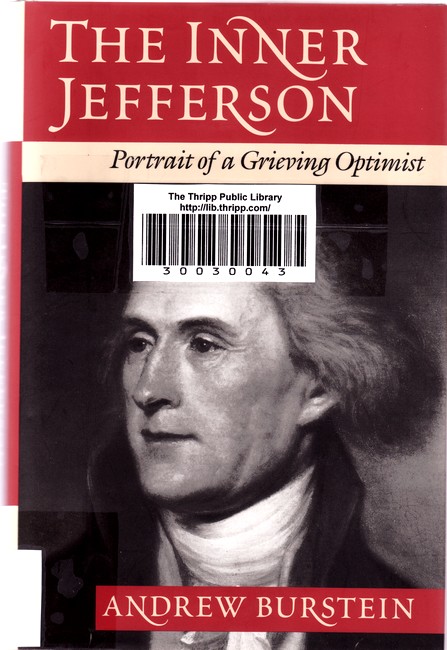
And here’s what a Thripp library card looks like:
Cataloging is on hold till I go to the store, because I’ve run out of clear packing tape to affix barcodes and spine labels.
Take a look at the catalog. Just click Search! to see everything. Then come back and tell me you’re not impressed.