I wish I could go back and change the past, but I can’t, so this is where we stand. At least we have memories.
All photos and editing herein by Richard X. Thripp, Aug-Dec 2008.






I wish I could go back and change the past, but I can’t, so this is where we stand. At least we have memories.
All photos and editing herein by Richard X. Thripp, Aug-Dec 2008.
I was looking for ways to optimize my website . . . to make it quicker and easier for me to maintain and update, while being fun to browse for my visitors. The problem with the old gallery and random photos at the top of each page, was that I had to make the thumbnails and update the page and database for both (I was using the this randomizer plugin for WordPress), each time I added a photo. It was good because I’d crop, scale down, and sharpen each image to look its best, but the extra work was too much. I found the Post Thumb plugin is the perfect solution. I installed it, set it to make 100×70 thumbnails, and then added this code to my blog header:
<?php the_random_thumb(“link=p&limit=5&category=8”); >
That makes it show five random photos from the category for my photos, linking to the page for each instead of the file. The great thing here is that the thumbnail folder and accompanying MySQL table is updated automatically, so photos are added to the pool as soon as I publish them. A random photos section is good for the casual browser, who just looks at what catches his eye.
Next, I wanted to create a dynamic gallery and random image page. I added the Exec-PHP plugin so I could use PHP code in pages and posts, but found that WordPress inserts a line break between each thumbnail, against my wishes. For that, I added this modified version of Text Control by Jeff Minard, then setting it to not auto-format the gallery and random pages.
The code for page one of the gallery is:
<?php the_recent_thumbs(“subfolder=g&width=200&height=160&link=p&limit=60&category=8”); ?>
and for page two:
<?php the_recent_thumbs(“subfolder=g&width=200&height=160&link=p&limit=60&offset=60&category=8”); ?>
The parameters with all the ampersands tell the script to make 200×160 thumbnails instead of the default, to save them in a subfolder named “g” (for gallery of course), to link to the posts the photos are in, to display sixty thumbnails per page from category 8 (my photos), and, on the second, “offset=60” means to start with photo #61 (computer programming languages count from zero). When I get over 120 photos (I’m at 83 now), I’ll have to make page three manually. I don’t mind that, since mine is a low-volume photo-blog focusing on quality, so I’ll only need to make a new page every few months. I’m stoked enough by what can be done without my help.
Next up was the random page:
<?php the_random_thumb(“subfolder=g&width=200&height=160&link=p&limit=24&category=8”); ?>
This is almost the same as the first gallery page; the function is the_random_thumb instead of the_recent_thumbs, and I reduced the number of photos from 60 to 24. It worked great, except the random photos would not be refreshed on each visit to the page. The problem was the caching module I use, WP-Cache, so I solved it by adding “/random” to the list of rejected URIs in its settings. Unfortunately, this makes the random page the most computationally expensive on the site, which is especially a concern because I’m on cheap, shared hosting. I’ll keep an eye on it, and if it gets too popular and things start crashing, I’ll reduce the number of images or pull the plug.
As if this wasn’t enough, I had another feature to add: a link to a random photo for sale in my expensive shop (powered by YAK), at the top of the sidebar on each page. After doing the above, this was easy:
<?php the_random_thumb(“subfolder=s&width=128&height=86&link=p&category=389”); ?>
This time, there is just one thumbnail per page, so “limit=” is omitted (it defaults to 1). The subfolder for the thumbnails is “s” for shop; you can make the subfolder’s name longer, but I’m keeping it short for simplicity. The width and height are different to match the size of my sidebar , and the category is #389, to show only posts from my shop for framed prints. I’m letting WP-Cache in place, but it clears every day (a.k.a. 86400 seconds), so each page will show a different print each day.
Is that enough? No, Post Thumb isn’t done helping me. I normally create the thumbnails and HTML code showing them for each photo, but the plugin can take care of that automagically. I made these choices in the settings:
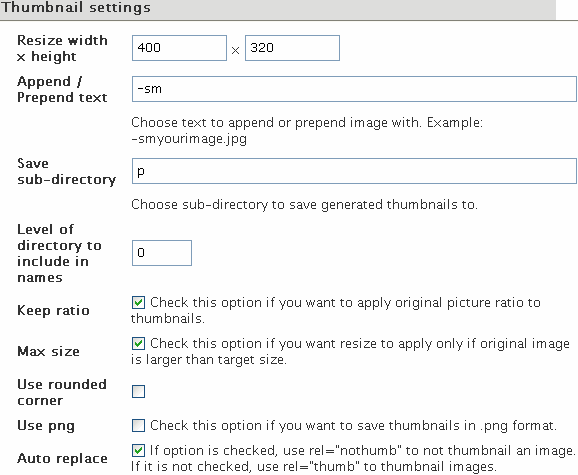
For the screen capture of the settings you see above, I added the rel=”nothumb” tag after the alt text, because it’s 475 pixels wide, so resizing to 400 isn’t needed. But I’ll be letting it auto-thumbnail most of the time. For Sunrays 3, for example, I would normally make a thumbnail, upload it, and write this HTML for the post:
<a href=”http://thripp.com/files/photos/sunrays-3.jpg” title=”Sunrays 3 — orange rays of sunshine pierce black clouds”><img src=”http://thripp.com/files/photos/sunrays-3-sm.jpg” alt=”Sunrays 3 — orange rays of sunshine pierce black clouds” /></a>
But now, I write this:
<img src=”http://thripp.com/files/photos/sunrays-3.jpg” alt=”Sunrays 3 — orange rays of sunshine pierce black clouds” />
. . . and the plugin resizes and saves the photo, uses the new version as the image, links to the full-size version, and specifies my alt text as the hover title, while showing the abbreviated code when I return to edit the post. And this is all done before sending it off to LiveJournal and Xanga (with LiveJournal Crossposter and Xanga Crosspost). Very cool, and better than what WordPress does out of the box.
Post Thumb finds the first image in a post, then using a thumbnail of it to represent that post. Since I only put one photo to an entry, it’s perfect in my case. I have both the convenience of a photo-blog and the versatility of a text blog. I can write text articles like this one right alongside my photos, both show up to my RSS and email subscribers, and I can include lengthy descriptions for my photos, while WordPress and Post Thumb do the heavy lifting to compile a detailed blog and minimalist gallery. This is more than can be said for WordPress 2.5’s built-in galleries, or the add-on solutions. It is much preferable for teaching galleries like my own, with lots of text and information accompanying images, than for people who just want to put up scads of photos with no details. I use Gallery2 for the scads of photos (my gallery is private). WordPress and Post Thumb bridge the gap.
While I was at it, I switched default fonts on the site from Lucide Grande to Arial, because it’s included with Windows, and renders better at small sizes in Firefox. I also changed the banner from olive green to a powerful black. The last step was to add links to the new gallery pages below the banner. Changes are good.