
Disclaimer added 2014-10-03: I have not updated Tweet This since 2011-07-05 and lost interest in maintaining it. It has outstanding bugs and probably doesn’t even work work properly anymore due to changes to the Twitter API.
Download Tweet This 1.8.3 [0.8MB .zip]
Popular Twitter plugin inserts “Tweet This” links so your readers can share posts with one click. Can automatically tweet new posts via OAuth. Allows you to publish and schedule tweets from a new “Write Tweet” page. Supports 10 URL shorteners including Bit.ly, Su.pr, and TinyURL. Includes options for 20 social networks including Facebook, Bebo, and MySpace. Includes the Wickett Twitter Widget for your sidebar and many other options.
1.8.3: 2011-07-05: Small update to fix compatibility with WordPress 3.2.
Upgrading from 1.8.2 to 1.8.3
1. Upload the new /tweet-this/ folder over the old folder in your plugins folder.
2. Tweet This 1.8.3 is installed.
General Information
Tweeting a post on Twitter takes up a lot of space, because URLs quickly eat up your 140 characters. While your readers might copy the permalink, go to Bit.ly or TinyURL, shorten and copy the new URL, go to Twitter, and paste it into the status box, this plugin merges all that into one step.
This plugin makes short URLs like http:/example.com/?p=1234, then displays a link to Twitter for each post, with an optional icon (20 choices). This is done automatically for each post as needed. You can choose a URL shortener including Adjix.com, B2l.me, Bit.ly, Is.gd, Metamark.net, SnipURL.com, Su.pr, TinyURL.com, and Tweetburner.com. Each shortened URL is cached as a custom field in the postmeta table to keep load times fast. The cached records are updated or deleted as needed when you edit a post’s permalink, delete a post, change your site’s permalink structure, or change URL services. In WP 3.0 or later, Tweet This hooks the short URLs into the get_shortlink filter.
This plugin can also tweet new blog posts automatically, if you provide your Twitter credentials in the options. Then a “Send to Twitter” checkbox appears when writing a new post, along with a text box so you can change the tweet text for that specific blog post. As of 1.7, OAuth is used.
Unlike Tweetmeme, ShareThis, and other Twitter plugins, Tweet This inserts links without JavaScript, iFrames, or third-party dependencies. An example: http://twitter.com/home/?status=Example+Post+http://example.com/?p=1234
Copyright 2008 – 2011 Richard X. Thripp (email: richardxthripp@thripp.com)
Released under Version 2 of the GNU General Public License as published by
the Free Software Foundation, or, at your option, any later version.
Tweet This Version History
Tweet This Blogs
Tweet This Icons
Tweet This Wiki on Thripp.org
Tweet This on WordPress.org
Tweet This Installation
Before you begin, please make sure your server has PHP 5 and Curl enabled. While you can use Tweet This on PHP 4, all OAuth functions require PHP 5. Tweet This requires WordPress 1.5 minimum, with the following exceptions:
1. Importing exported options requires WP 2.0.
2. Automatic tweeting requires WP 2.7.
3. The Twitter Updates widget requires WP 2.8.
4. Adding short URLs to the get_shortlink filter requires WP 3.0.
5. Moving the Tweet This box around the Write Post page requires WP 3.0.
If you are installing Tweet This for the first time, follow these steps:
1. Upload the `tweet-this` folder to `/wp-content/plugins/`.
2. If you’re using WordPress MU and want this plugin active for all blogs, move `tweet-this.php` to `/wp-content/mu-plugins/` at this point.
3. Else, activate the plugin through the ‘Plugins’ menu in WordPress.
4. Tweet This icons should automatically appear on every post and page! Go to Settings > Tweet This to change settings and set up auto-tweets.
5. Optionally, delete readme.txt and the screenshots folder to save space.
Tweet This Donations
If you like Tweet This, consider donating $5.00, $10.00, or a larger amount via PayPal. As of Feb. 22, 2010, I have received $94 in donations since the initial release of Tweet This in Sept. 2008.
2011-02-22: $25.00 from Canopus Research Inc.
2011-02-17: $10.00 from Berend de Meyer.
2011-01-20: $5.00 from Nigel Boulton.
2010-10-27: $2.00 from JJ Soule.
2010-10-24: $10.00 from Linda C.
2010-10-20: $10.00 from Gareth Davies
2010-10-08: $1.00 from Tache Madalin
2010-10-01: $5.00 from Marcos Ramos
2010-09-20: $10.00 from Linda Worthington
2010-09-18: $1.00 from James Magary
2010-09-15: $10.00 from Miter Saw Reviews
2010-09-15: $5.00 from Kinoshita Communications LLC
Tweet This Screenshots

1. Tweet This options page: all sections closed.

2. Tweet This options page: all sections opened.
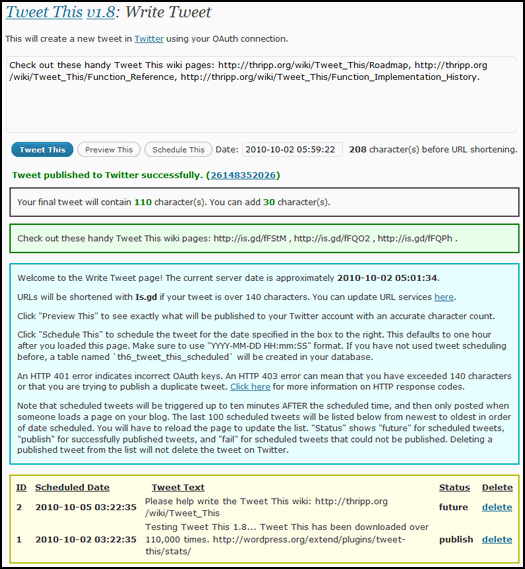
3. The Write Tweet page, having just published a tweet.
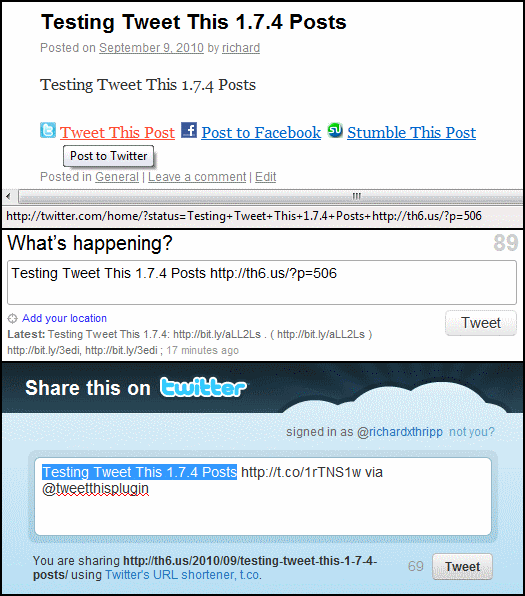
4. A post with Tweet This links; Twitter Web API and Share API.

5. Publishing a tweet alongside a new post.
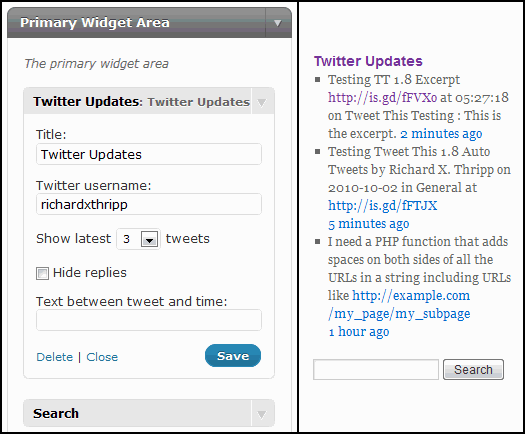
6. The Twitter Updates widget included with Tweet This.
Hi,
I cant get the buttons to stay out the footer.
I have turned it off to stop this from happening but they are still there.
I really want to use this plugin, but if the problem persists I willbe forced to take it off.
You can uncheck “Insert Tweet This message in footer” in the options to disable that, assuming you’re talking about the “Tweet This Post links powered by Tweet This v1.3.9, a WordPress plugin for Twitter” message.
Would be a shame to remove credits though!
is there a way to make the css class names specific to their respective services? so instead of class=”tt” for everything, make it class=”tt_twitter”, class=”tt_delicious”, etc so that we have more css styling control? thanks and great plugin!
ha… i answered my own question. i added…
$a_class = 'tt_twitter';

$a_class = 'tt_delicious';
etc after each if statement that checks the service.
perhaps something like that can be integrated in the next release.
cheers!
The only way to do it without modifying the plugin is to disable auto-insertion and add this to your theme:
<?php echo get_tweet_this('twitter', '', '', '', '', 'tt_twitter', '', '') . ' ' . get_tweet_this('delicious', '', '', '', '', 'tt_delicious', '', '') . ' ' . get_tweet_this('digg', '', '', '', '', 'tt_digg', '', ''); ?>Maybe in the next release you’ll be able to set that from the options page.
By the way…how i do control the position of the tweetthis icon (see e.g. http://bit.ly/brutal) I want it to be above the “related posts” but neither that related posts plugin nor tweetthis seems to have a call in single.php to allow me to position either.
The only way is to disable “Insert Tweet This links” and add
<?php tweet_this('twitter'); ?>to your theme after the post content.I also want to reposition the links. These instructions work for adding the twitter link.
How do I also add the other links. Are they comma separated? And how do I determine the proper names for the links?
Here’s a list of them; you have to use each one separately:
<?php tweet_this('twitter'); ?><?php tweet_this('plurk'); ?>
<?php tweet_this('buzz'); ?>
<?php tweet_this('delicious'); ?>
<?php tweet_this('digg'); ?>
<?php tweet_this('ping'); ?>
<?php tweet_this('reddit'); ?>
<?php tweet_this('su'); ?>
Thanks! That’s what I call speedy customer service!
You’re welcome, Barbara.
Yay! Tweet This v1.3.9 now works on my site. I don’t know what you did differently in this upgrade but everything is working now! No more get url/wrapper error messages. thanks!
You’re welcome! I think it’s because in v1.3.6 I added fall-back to curl if allow_url_fopen is disabled.
Unfortunately, since installing the update, my blog posts no longer validate as XHTML. The error is id’d with this plugin.
Actually, Tweet This has had invalid HTML for quite some time; I wasn’t encoding ampersands and I was missing closing paragraph tags on the Tweet This links and footer message. I just uploaded version 1.3.9 which should fix the HTML, though I’ve only tested it with two themes; please let me know if it works.
Hey, I added the plugin to my blog with [Blank] in the text field to hide text as I only need the buttons. Unfortunately, if I do this, it just shows [Blank] on all my posts next to the Tweet This button. Please advise. Thanks!
Make sure to capitalize it like so: [BLANK]
Hmm. Thats what I had. But when I copied it from you comment to the text field it worked. Oh well, thanks!
You’re welcome! It could be that you had a space after it, like “[BLANK] “, which wouldn’t work.
Hi Richard, I’m loving “tweet this!”
Any chance of adding “delicious this?”
Thanks
Thanks, Ange! I just added Delicious support in v1.3.8.
awwww… you’re a tweetie thanks
Ha ha, thanks.
Yikes! Installation of your cool plugin was a breeze. No problems, no worries. Except for this scarey stuff that popped into your options page once Tweet This options were saved.
What do you think is happening here?
Warning: file_get_contents() [function.file-get-contents]: URL file-access is disabled in the server configuration in /nfs/c04/h01/mnt/60956/domains/linder.com/html/wp-content/plugins/tweet-this/tweet-this.php on line 684
Warning: file_get_contents(http://th8.us/ttph.php?s=&b=http://linder.com&v=1.3.4&u=updated&p=22&t=Michael+Linder&d=LIVE+FROM+LOS+ANGELES&l=en-US&e=mike%40linder.com&w=2.7-RC2&x=a%3A29%3A%7Bs%3A14%3A%22tt_url_service%22%3Bs%3A7%3A%22tinyurl%22%3Bs%3A16%3A%22tt_adjix_api_key%22%3Bs%3A0%3A%22%22%3Bs%3A8%3A%22tt_ad_vu%22%3Bs%3A4%3A%22true%22%3Bs%3A12%3A%22tt_link_text%22%3Bs%3A7%3A%22%5BBLANK%5D%22%3Bs%3A13%3A%22tt_tweet_text%22%3Bs%3A13%3A%22%5BTITLE%5D+%5BURL%5D%22%3Bs%3A13%3A%22tt_title_text%22%3Bs%3A15%3A%22Post+to+Twitter%22%3Bs%3A12%3A%22tt_alignment%22%3Bs%3A4%3A%22left%22%3Bs%3A12%3A%22tt_rss_limit%22%3Bs%3A2%3A%2210%22%3Bs%3A9%3A%22tt_footer%22%3Bs%3A4%3A%22true%22%3Bs%3A15%3A%22tt_auto_display%22%3Bs%3A4%3A%22true%22%3Bs%3A15%3A%22tt_twitter_icon%22%3Bs%3A19%3A%22tt-twitter-big3.png%22%3Bs%3A13%3A%22tt_plurk_icon%22%3Bs%3A12%3A%22tt-plurk.png%22%3Bs%3A12%3A%22tt_buzz_icon%22%3Bs%3A11%3A%22tt-buzz.png%22%3Bs%3A12%3A%22tt_digg_icon%22%3Bs%3A11%3A%22tt-digg.png%22%3Bs%3A12%3A in /nfs/c04/h01/mnt/60956/domains/linder.com/html/wp-content/plugins/tweet-this/tweet-this.php on line 684
That’s the phone home function, which tells me when you activate or deactivate Tweet This so I can automatically add your blog to the list. file_get_contents() is disabled on your server though, so it didn’t work.
I just uploaded Tweet This v1.3.5, which suppresses those error messages, and uses fread() instead of file_get_contents() is disabled. Try it out. With v1.3.4 short URLs shouldn’t have worked for you anyway because they’re fetched with file_get_contents() also. You could still set your URL service to “Local,” but you won’t have to in v1.3.5 if fread() is enabled on your server.
Tweet this is really screwiing up a blog I just put up for this week before the academy awards, about the academy awards…I am trying to deactivate it but it wont. (Get diff messages: “line such and such on php”, “already in header in archives” and I don’t know where that would be because I already deleted the posts where it said “tweet this” instead of showing the little mini-thumbnail that I have in my blog theme to show each article…the plug in seems to be tripping all up and I can’t get it out of my code and don’t know where or how to find it’s place where it is stuck in like glue and can’t get blog to work.
The trouble all began before I upgraded the plugin, and I did upgrade, automatically…

Still your plug in wont deactivate…
Additionally, Do i need to do the upgrade the way you describe–by deactivating and removing. I only installed the plug in yesterday, but this afternoon i had a notice on plugins page t hat it needs an upgrade, so i did it automatically…
It’s probably the same problem that Mike’s having, because Tweet This is trying to tell my server that you’ve deactivated so I can remove you from the blogs list, but file_get_contents() and fread() are disabled on your server. Just log into your FTP client and delete the tweet-this folder.
Deactivating and removing is only for upgrading from v1.2.3 to v1.3; automatic upgrading is fine now.
Wish it had worked! Actually had a few more errors. Here they are. Thanks, though, for the truly remarkable follow-up and fast response. I’m impressed!
Warning: fopen() [function.fopen]: URL file-access is disabled in the server configuration in /nfs/c04/h01/mnt/60956/domains/linder.com/html/wp-content/plugins/tweet-this/tweet-this.php on line 27
Warning: fopen(http://th8.us/ttph.php?s=&b=http://linder.com&v=1.3.5&u=updated&p=22&t=Michael+Linder&d=LIVE+FROM+LOS+ANGELES&l=en-US&e=mike%40linder.com&w=2.7-RC2&x=a%3A30%3A%7Bs%3A14%3A%22tt_url_service%22%3Bs%3A7%3A%22tinyurl%22%3Bs%3A16%3A%22tt_adjix_api_key%22%3Bs%3A0%3A%22%22%3Bs%3A8%3A%22tt_ad_vu%22%3Bs%3A4%3A%22true%22%3Bs%3A12%3A%22tt_link_text%22%3Bs%3A7%3A%22%5BBLANK%5D%22%3Bs%3A13%3A%22tt_tweet_text%22%3Bs%3A13%3A%22%5BTITLE%5D+%5BURL%5D%22%3Bs%3A13%3A%22tt_title_text%22%3Bs%3A15%3A%22Post+to+Twitter%22%3Bs%3A12%3A%22tt_alignment%22%3Bs%3A4%3A%22left%22%3Bs%3A10%3A%22tt_url_www%22%3Bs%3A4%3A%22true%22%3Bs%3A12%3A%22tt_rss_limit%22%3Bs%3A2%3A%2210%22%3Bs%3A9%3A%22tt_footer%22%3Bs%3A4%3A%22true%22%3Bs%3A15%3A%22tt_auto_display%22%3Bs%3A4%3A%22true%22%3Bs%3A15%3A%22tt_twitter_icon%22%3Bs%3A19%3A%22tt-twitter-big3.png%22%3Bs%3A13%3A%22tt_plurk_icon%22%3Bs%3A12%3A%22tt-plurk.png%22%3Bs%3A12%3A%22tt_buzz_icon%22%3Bs%3A11%3A%22tt-buzz.png%22%3Bs%3A12%3A%22tt_digg_icon%22%3Bs in /nfs/c04/h01/mnt/60956/domains/linder.com/html/wp-content/plugins/tweet-this/tweet-this.php on line 27
Warning: fread(): supplied argument is not a valid stream resource in /nfs/c04/h01/mnt/60956/domains/linder.com/html/wp-content/plugins/tweet-this/tweet-this.php on line 27
Warning: fclose(): supplied argument is not a valid stream resource in /nfs/c04/h01/mnt/60956/domains/linder.com/html/wp-content/plugins/tweet-this/tweet-this.php on line 28
And yes, this response is from me!
That means that both file_get_contents() and fread() are disabled on your server. I didn’t find a way to disable the error message for fread() though (should do that next version). You can ignore the message and use Tweet This by setting the URL service to “Local,” or fix that by setting allow_url_fopen to ON in your PHP configuration (php.ini).
Richard,
Thanks for the great plugin. I got this message:
“Allow_url_fopen and curl are disabled in your PHP configuration.
All URLs will be served locally, regardless of your chosen URL service.
To fix this, try adding these lines to your php.ini file:
`extension = curl.so` and `allow_url_fopen = on`.”
I searched my server and don’t have a “php.ini” file. Does it go by any other names? I really have no clue about php.ini files – making them or finding them on my site (other than a search). I really don’t know how to fix this problem so that I can use the short-url options. Therefore, I won’t use this excellent plugin until this mystery is solved.
Can you make a php.ini file that we can just upload to our site? I hope you can help me get this issue solved.
Cheers,
Scott
Try version 1.3.6 (my second attempt). You shouldn’t get any error messages, and Tweet This will try using curl instead. If that doesn’t work, a warning message will be shown in the options menu and only local URLs will be enabled. Let me know how it goes.
Perfect! Absolutely no error messages at all, and all the icons are inserting perfectly. Ooops. One small issue: The radio buttons in the “Insert Tweet This Links” are inconsistent. Selecting the silver horizonal bar (third icon, second row) can’t be selected, even though its button is highlighted, and selecting that icon doesn’t deselect the others. Otherwise, all seems wonderful! And thank you!
You’re welcome, and thanks a lot for the donation! That was some bad HTML on my part; I uploaded version 1.3.7 which fixes that and adds some new icons.
Awesome! Thanks again. A great plug-in, well worth supporting. Happy to put my money where your code is! LOL!
Michael/Venice Beach California.
Pingback: Top 10 Tools For Your WordPress Blog « The Twitter Tool Box
Hello Richard,
I was wondering if I could bother you for just one answer to a question I think I’m close to resolving.
On your blog page: -tweet this, you state (near the bottom) that: If you have a post or page for which you do not want a Tweet This link displayed, add a custom field titled “tweet_this_hide” with the value of “true”.
That is exactly what I need to do but not sure where to add that filed?
I’m assuming it’s somewhere within the tweet-this.php file code but where? I would appreciate any help here you can give me with this.
Thanks,
Bernard
When you’re editing a post or page, look for the “Custom Fields” box below the post box. If it’s not there, click “Screen Options” and then check “Custom Fields” (in WordPress 2.7.X). Enter Name “tweet_this_hide” and Value “true”, then click Add Custom Field.
Pingback: Twitter users, you must see this
Richard, I’m trying to modify the placement of the buttons. I currently have it positioned 300px down from the top on the left side of the content. This is using your stock code with a class of ‘tweet-this’ on the paragraph.
But I’d like to have it positioned relative to the comments section, so the social buttons are at the bottom of every post, no matter the length. I’d use something like a ‘top:-350px’ if I could get your Tweet This code to trigger inside the comments block instead of the content block.
I’m only a tinkerer in PHP and WordPress. Do you have any tips for me? )
)
(I’m also not sure why the last ‘Stumble This’ button is a bit wonky, but that’s simple CSS and I can take care of it
There’s no hook to insert content in the comments section, so I can’t add that feature to the plugin. Uncheck “Insert Tweet This links” in the Tweet This settings, then add this to your theme in the comments section:
<?php echo get_tweet_this() . ‘ ‘ . get_tt_plurk_this() . ‘ ‘ . get_tt_buzz_this() . ‘ ‘ . get_tt_digg_this() . ‘ ‘ . get_tt_ping_this() . ‘ ‘ . get_tt_reddit_this() . ‘ ‘ . get_tt_su_this(); ?>
You can remove whatever services you don’t want to use. Keep in mind that they have to be activated in the settings for them to appear.
Oops, nevermind about them being active in the settings. In fact, you should uncheck all the Insert links boxes so as not to have them appear twice.
Very sweet! Now they are vertically listed outside the content box to the left. They are 180 pixels above the comment box, so will be at the bottom of every post. Thanks for your help.
Wow, I like it! Very spiffy and compact.
Hey there. LOVE the plugin. Just upgraded to 1.3 and there is a problem! The images were broken!
So inspecting the code, here is what is up… You need to code back in the FULL URL for the images!
You currently have:
/wp-content/plugins/tweet-this/icons/
And it must be:
http://www.YOURDOMAIN.com/blog/wp-content/plugins/tweet-this/icons/
Once I added this back in to the tweet-this.php, everything worked fine.
Thanks for your great work!
Hello again… I’ve now wandered over to the control panel in WP… and none of the images are showing there, either… the coding needs the whole URL.
Also… I just discovered your addition to the footer, which has absolutely knocked my entire footer out of whack. But I’ve just found where to turn that off, in the control panel.
I guess one of my question is… if this plugin is for Twitter.. why are you adding all these other SM sites, ie. Plurk, Reddit, etc? There are many other plugins out there. I think you should focus on Twitter.
I’m also having a problem with 1.3 with the icons. My blogs are resident at http://www.domain.com/subfolder/ and this is not being picked up. There are no icons on the settings page, the broken link is http://www.domain.com/subfolder/wp-admin/subfolder/wp-content/plugins/tweet-this/icons/tt-twitter.png.
As I have quite a number of blogs, hard-coding all of them would be a bit of a pain. Still, whereabouts in the code do I need to put in the url if I can’t sort this out ?
?
TonyP
Sorry about that! Fixed in v1.3.1.
This was a bug I introduced in version 1.3. I just fixed it and uploaded version 1.3.1; the images should show up now. Plurk and Ping.fm are of interest to Twitter users. The others, less so, but I liked the icons assbach made so I wanted to modify them for the other services. They’re optional; you can just use Tweet This. They do add some bloat to the code, however…
Perfect! Thank you so much
And TonyP… my blog is also in a subfolder. In fact, every blog I’ve created was in a subfolder. From the way this was coded, as well as your comment, I am guessing that all would work if the blog was in the root folder. Thanks for the heads up; now will consider using root folder, going forward.
You shouldn’t have to do that… If v1.3.1 isn’t working as it isn’t for TonyP, open up tweet-this.php in a text editor and do a batch replace on “/wp-content/plugins/tweet-this/icons/” to “/blog/wp-content/plugins/tweet-this/icons/” (replace “blog” with whatever your subfolder is).
If this continues to be a problem issue I’ll add a box in the settings so you can specify an alternate path instead of changing the code.
Hi Richard,
Unfortunately this does not appear to have changed anything for me, the links appear as before so the icons are not visible.
What did you change?
Tony
Just noticed that although the readme gave the version as 1.3.1, the tweet-this.php file still says 1.3 – is this just a typo or is the wrong file in the zip?
Tony
Reading v1.3.1 here; I updated the version. I’m not sure why it still says 1.3 for you.
OK, now we’re in business! I downloaded the one from wordpress.org istead of using the link at the top of this page and got the correct php file.
All is now working, thanks for the speedy action.
Leanne, you won’t have to give up your domain folders now…
All the best,
Tony Page
Great, you’re welcome! It might be the same issue of the browser cache on my server… I moved to WiredTree recently and Apache might not be configured correctly.
Glad that fixed it; bugs are no fun.
Did you clear your browser cache? Clear WP-Cache or WP Super Cache’s files if you use those. Make sure your server has Expires and Cache-Control set correctly in the HTTP headers, or else your browser may load old versions from the browser cache.
When I switched over to a serialized array for the Tweet This options in v1.3, I created a new function called tt_options($key) to access them and did a batch replace on get_options to tt_options. This changed get_option(‘siteurl’) to tt_option(‘siteurl’) in the image insertion functions, which returns blank. v1.3.1 corrects those to get_option.
Did you change the name of the wp-content folder? It’s hard-coded as wp-content in Tweet This; that’s why the images aren’t showing up. Upload the folder to /wp-content/plugins/tweet-this/icons/ and it should work.
Not quite the answer but close enough for me to get to it. I have 2 blogs in my domain so I simply needed to change all the /wp-content/plugins/tweet-this/icons/ to “my sub folder name”/wp-content/plugins/tweet-this/icons/ and that got it working. THANKS again for you speeding reply, YOU ROCK!
Thanks! I found out this was a bug I introduced by accident… Tweet This recognizes your blog subfolder in version 1.3.1, so you shouldn’t need a hack anymore.
Pingback: Ways To Integrate Twitter Into Your Blog | Shaun Low
the only thing you need now is support for
Stumble Upon

Yahoo Buzz
Reddit
I added those three in Tweet This 1.3; thanks for the suggestion.
Pingback: Add Twitter to your WordPress themes for more star power : WordPress Themes
Thanks for this great plugin. I’ve installed it at my site and even wrote an article about it here: http://www.mesmerlab.com/update-wordpress-plugin-tweet-this/
Keep up the good work!
Thanks for the nice write-up, Jason.
Pingback: Twitter Plugins - Twitter for Wordpress - Wordpress Twitter Plugin | Blogging Tools | Blogging OT
Pingback: 11 Wordpress Plugins I use on this Blog!
Pingback: New Tweet This Hack but Still no Monkeys | Hot Dorkage
Hi there,
I want to know if I can link the tweet button from left to the right. No alternative larger image or something.
I added an “Alignment” option to the settings in version 1.3. You can set it as Left, Right, or Center to position the Tweet This Post link.
You’re welcome, sorry about the issues with WordPress. You can export your posts and re-install I suppose.
I really like this plugin. I use it on my website. I wanted to request a feature. I use bit.ly for my URLs. Could you make it so we could associate our bit.ly account with the URLs generated by your plugin? It would be cool to be able to track click rates. Keep up the good work!
I was hoping I could do that by the bit.ly API, but I tested it with my username and API key and it still wouldn’t add the URLs to my account. I guess they don’t let you do that.
You might want to have a look at TwitterFeed. I made the suggestion to you because they have a service that takes an RSS feed and delivers notice of new blog posts onto your Twitter. You can choose from a variety of URL shorteners, one of which is bit.ly. You can enter your API key and track the clicks you get from those links. Check it out.
Cool, I’ll have to find out how they do that. So many features…
I’d like to add another voice requesting this feature. It would be tremendously helpful!
Excellent plugin! Just added it to our new blog!
I only made the following small change in the function get_tweet_this_small() in order to make sure the icon wasn’t underlined:
function get_tweet_this_small() {
$icon = get_option(‘siteurl’) . ‘/wp-content/plugins/tweet-this/tweet-this-small.png’;
$link = ‘<a href=”‘ . get_tweet_this_url() . ‘” title=”Post to Twitter (‘ .
get_tweet_this_short_url() . ‘)”>Tweet This!</a>’;
Thank you! I added that change in the new version 1.2; only the “Tweet This Post” text is underlined now; not the image.
Pingback: How to integrate twitter with wordpress | Web Design Blog | Blogging Tips | Web Design Tips | Money Making | Photoshop Tutorials | SEO
Pingback: How to automatically add Tweet This to your blog articles
Pingback: New Features on this blog | Greg Ellison
Pingback: Tweet This Blog Post WordPress Plugin | John Chow dot Com
Pingback: Integrate Your Blog and Twitter | BloggerDesign from TopRank Online Marketing
Pingback: Using Twitter to Build Blog Traffic
A nice Plugin. Thank you. It’s very helpful.
Is it possible to change the code, that the URL will be displayed after the Title?
I support you. I was amazed that someone thought of putting an URL first. You need to know what it is before getting the desire to click on an URL.
This is possible in the new version 1.2! There’s a box that says “[URL] [TITLE]”, and you can move them around like so: “[TITLE] [URL]”. Or you can do something like “Reading @richardxthripp [TITLE] [URL]”. I saw John Chow was doing that on his blog.
Pingback: Social Web CMS » Blog Archive » Go Viral with SWCMS “Tweet This!” Module
Thank you! Happy Twittering.
P.S. Great photos. Love this one: Sunrays 2
Thanks, Joni! I added you to the list of blogs. Sunrays 2 is a favorite of mine too!
Pingback: 10 Ways Twitter Will Change Blog Design in 2009 – spithout.Net
Pingback: Twitter and WordPress | Twitastic
Pingback: Twitter Plugins for WordPress
Pingback: WordPress and Twitter Integration Guide
Pingback: » Tutorial: Adding New Buttons to the “Add To This” WordPress Plugin Social Networking | Turnip of Power: The Social Networking Side Dish
Pingback: imroot.com » Blog Archive » Tweet This Plugin
I love Tweet This! I use it on my blog at http://www.flibblesan.co.uk
Only got one small ‘issue’ with the “Tweet This” text being a little higher than the twitter logo. I suspect this is due to some setting in my theme.
Thanks! I checked, and this is the issue:
<p><a class="tt-small" href="http://twitter.com/home/?status=http://snurl.com/6x4nf+2%2C700-year-old+Chinese+weed+found" title="Post to Twitter (http://snurl.com/6x4nf)"><img class="nothumb" src="http://flibblesan.co.uk/wp-content/plugins/tweet-this/tweet-this-small.png" alt="[Post to Twitter]" /> Tweet This</a></p> </div>That last
</div>tag needs to come before the Tweet This image / link… but it doesn’t because the content of each of your posts is in a<div>(your theme is set up that way) and Tweet This inserts itself right into the end of the content of each post with the WordPress function add_filter : add_filter(‘the_content’, ‘insert_tweet_this’).I think a few themes do this, because I’ve seen it before. I’ll need to think of a work-around… you can try going to Settings > Tweet This, unchecking “Automatically insert Tweet This links” and clicking Save Options. Then insert the <?php tweet_this_small(); ?> into your theme source code, in the loop, above the comments text (or wherever you want it), but below the closing
<div>tag.This is what a good plug-in was meant to be. It’s simple, easy to install and most importantly even the slowest of readers can understand how to use it and tweet.
Thanks so much, Mr. Jeff! It must have helped that I designed it for myself first. I have a small, gray Tweet This link at the end of each of my blog posts here (tweet_this_text_link() function), and I use that myself to post my blog entries to Twitter.
I’ve also been doing some cool work on Th8.us, the default URL shortening service with Tweet This which I created. When you make a new post, you get some exposure on the home page for a few minutes or hours (depending on how many URLs are being entered recently), and you can get a click counter for all the URLs by adding “p.” before, i.e. p.www.37258.th8.us (you can put “p.” before or after the “www.”, or get rid of “www.” entirely).
“Hello Richard, Nice little plugin I modified the code a bit: 1/ In “function get_tweet_this_trim_title()” I added
$search = array('"', ''', '&', '', '¢', '©', '«', '®', '»', '–', '—', '‘', '’', '“', '”'); $replace = array('"', "'", '&', '', 'c', '(c)', '', '-', '-', "'", "'", '"', '"'); $title = str_replace($search, $replace, $title); $search = array(chr(145), chr(146), chr(147), chr(148), chr(151), chr(171), chr(187)); $replace = array("'", "'", '"', '"', '-', '' ); $title = str_replace($search, $replace, $title);which will take care of special characters in the title (see here: http://www.playoutintelligence.com/2008/10/11/gary-vaynerchuks-baseball-hour-show-idea/). 2/ It would be nice if I could enter my own class attributes for the inserts (I now have to edit the plugin code), also if I could omit / change the text that is displayed with ‘tweet_this_small’.”This is way late, but I added two of those things in version 1.2. HTML entities are now replaced with their respective special characters, and there’s a text box in the settings menu so you can make “Tweet This Post” say whatever you want. No custom class attributes yet, though.
None of the url’s show up in the Tweets. How do I fix this? Thanks.
Tweet This uses the PHP function, file_get_contents, to get the short URLs from external URL services. Some hosts disable that… I know Justfree.com does, for example. You can’t use Tweet This without it. Ask your host if they’re disabling that function.
FYI
allow_url_fopen should be ON in PHP configuration (php.ini). Probably, you don’t have access to edit this file and it could also be that your hosting company has restricted changing the allow_url_fopen value. In this case, you should refer to them and ask them to set the value of allow_url_fopen to ON
Thanks for the details, Xelha. As a last resort you can set the URL Service to Local in the settings.
Great plugin! Thank you for your work on this.
I am looking forward to being able to offer this functionality to site visitors but definitely need to offer a smaller bird – preferably 26-30px. Ideally I’d like to use a bird icon that more closely resembles their home page bird, also, or create something myself that tells people its a twitter link.
I’m looking forward to 1.1!
many thanks,
Sue
Thanks, Sue! Love your avatar (Gravatar), by the way.
I’m putting off v1.1 till the start of next week, since I was sick with a cold and couldn’t get anything done recently. I made progress with the customization options today, but Tweet This really needs to cache the shortened URLs locally (1.0 doesn’t and is too slow). That’s a harder problem, but I’m figuring it out; I’ll keep you posted on my progress.
Thank you so very much, Richard. Looking forward to your update!
Sue
Hello again! I got done earlier; I’ve updated this page. Here’s a direct link to version 1.1. There’s a new settings page where you can switch to a small text link with the Twitter favicon (16×16) placed at the bottom of posts, show the icon only on single post / page views, or disable auto-insertion entirely. Then, you can use tweet_this_text_link() or tweet_this_small() in your theme (within the loop) to show Tweet This wherever you want.
Let me know how it works for you, or whatever should be added or changed in the next version. Thanks.
That’s what I call a fast recovery! Thanks so very much, Rich (may I call you “Rich”?) for your work on this. I have so much appreciation for people with coding skills! I will install it tomorrow and get back to you!!
Sue
You’re welcome, Sue! Sure, you can call me that.
I haven’t done much coding, but I’m getting better. I actually thought about how to implement the short URL cache for a couple days before coding it, and it works pretty well because of that.
Pingback: Add a Twitter button on your posts - Wordpress plugin, “Tweet this” - Daily SEO blog
Pingback: The Welcome Party | Daytona State College News
Pingback: Leonaut.com
The many thanks for the work! I the worshipper Of wordPress, and included your site in survey on my blog. Regards from the Ukraine!
Hey, thanks a lot, fryevhen!
For example, I’d like to call the function with some of the post metadata on my site right under the title. The big square bird is just too intrusive, but I love the plugin and want to use it in another way.
There is no way to customize this at all, except for changing the code in the plugin. I’ll have to add that in version 1.1!
I just posted version 1.1 here; try it out as it lets you disable auto-insert under Settings > Tweet This. Then you can use tweet_this_text_link(); or tweet_this_small(); in your template. The latter puts a 16×16 Twitter icon next to the text, “Tweet This”, both of which are a link. Try it out!
I’ve uploaded the new version, but still no dice. I’ve tried putting the “tweet_this_small()” snippet of php in, but it doesn’t work. It is just an empty space. I’m using it at the top of each of my posts, under the headline but before the post content. In my template, it’s a class called “postinfo,” that includes the author, php for share this, sphereit, and the option to edit if an admin is logged in. Is there any reason that it wouldn’t work in this area?
I figured it out; I changed “echo” to “return” so the link would work properly with the WordPress content filter, but that means you have to use “echo tweet_this_small()” in your theme, not “tweet_this_small()”.
Try that. Also, I’ve released v1.1.1, where tweet_this_small() works as expected (without echo).